Julia is a high-level, high-performance programming language primarily designed for numerical and scientific computing. Launched in 2012, Julia has gained significant popularity due to its ability to offer the performance of low-level languages like C while maintaining the flexibility and ease of use of higher-level languages like Python and MATLAB. Julia is particularly useful for tasks involving data analysis, machine learning, numerical simulation, and scientific computing.
Key Features of Julia
High Performance
Julia is designed for speed and can match the performance of low-level languages like C. It uses Just-In-Time (JIT) compilation with LLVM to generate optimized machine code, making it an excellent choice for computationally intensive tasks.
Dynamic Typing
Julia is dynamically typed, which makes it flexible and easy to use. However, it also supports optional type declarations, allowing developers to improve performance when necessary.
Multiple Dispatch
Julia’s multiple dispatch system allows functions to be defined for different combinations of argument types, making it flexible and efficient. It dispatches the correct function based on the types of all input arguments, making the code more general and expressive.
Parallel and Distributed Computing
Julia provides built-in support for parallel and distributed computing. It includes features for multi-threading and multi-processing, making it suitable for large-scale data analysis and complex simulations.
Rich Ecosystem of Libraries
Julia has a growing ecosystem of libraries and packages, including:
- DataFrames.jl (for data manipulation)
- Flux.jl (for machine learning)
- JuMP.jl (for optimization)
These libraries enhance Julia’s capabilities in various domains like statistics, machine learning, and optimization.
Mathematical Syntax
Julia offers a syntax similar to MATLAB, making it easy for scientists and engineers to adopt. It excels in numerical computations, such as matrix and array operations, which are optimized for performance.
Interoperability
Julia is highly compatible with other programming languages, such as Python, C, R, and Fortran. This allows users to leverage existing codebases and libraries without sacrificing performance.
Garbage Collection
Julia uses automatic garbage collection to efficiently manage memory, reducing the complexity of memory management and minimizing the risk of memory leaks.
Open Source and Cross-Platform
Julia is open-source, meaning it is free to use, modify, and distribute. It is cross-platform and can run on Linux, Windows, and macOS, making it versatile across different environments.
Common Use Cases of Julia
Data Science and Analytics
Julia is well-suited for data science tasks, including data manipulation, analysis, and visualization. Its speed and ability to handle large datasets make it a powerful tool for data scientists.
Machine Learning
Julia has a number of machine learning libraries, such as Flux.jl and MLJ.jl, that allow users to implement deep learning models and traditional machine learning algorithms efficiently.
Scientific Computing
Julia excels in scientific computing tasks, including simulations, solving differential equations, and optimization problems. Libraries like DifferentialEquations.jl and JuMP.jl are widely used for modeling and simulations.
Numerical Analysis
Julia is ideal for numerical analysis, including tasks like linear algebra, optimization, and differential equations. Its high-performance computation capabilities make it a top choice for researchers in fields requiring complex numerical methods.
Financial Modeling
Julia is used in finance for risk analysis, derivative pricing, and quantitative finance. Its speed and efficiency allow for running large financial simulations and modeling complex systems.
Bioinformatics and Computational Biology
Julia is becoming popular in bioinformatics and computational biology due to its ability to handle large datasets and run complex simulations, such as those required in genome sequencing and protein folding.
How Julia Works
Just-in-Time (JIT) Compilation
Julia uses LLVM for JIT compilation, meaning it compiles code at runtime. This allows Julia to achieve high performance by optimizing code specifically for the architecture on which it is running.
REPL (Read-Eval-Print Loop)
Julia provides an interactive environment through its REPL, allowing users to execute commands line-by-line. This feature is useful for quick testing, calculations, and debugging.
Packages and Environments
Julia’s Pkg.jl system is used to manage libraries and dependencies. It allows you to install, update, and manage packages. Additionally, you can create isolated environments for specific projects to avoid dependency conflicts.
Parallel Computing
Julia supports parallel computing through constructs like @distributed for distributing work across multiple processors or machines and @threads for multi-threading. These features allow users to efficiently perform large-scale computations.
Installing Julia
Installing Julia on Linux (Ubuntu)
Julia can be installed on Linux using package managers like apt or directly from the Julia website. Once installed, you can run Julia from the terminal by typing julia.
Installing Julia on Windows and macOS
Julia provides easy-to-follow installation instructions for both Windows and macOS on its official website. Simply download the appropriate installer for your operating system and follow the installation steps.
Julia vs. Other Programming Languages
Julia vs Python
While Python is known for its simplicity and broad ecosystem, Julia offers superior performance, especially for numerical and scientific computing. Julia’s ability to handle large-scale computations efficiently makes it an excellent choice for performance-critical applications.
Julia vs MATLAB
Julia is often seen as a modern alternative to MATLAB. While MATLAB is popular in scientific computing, Julia provides better performance, is open-source, and offers more extensibility, making it a more attractive option for many users.
Julia vs R
R is commonly used for statistical analysis, but Julia’s speed and performance advantages make it a better choice for computationally demanding tasks. Julia also provides more flexibility and scalability for large datasets.
Julia is a high-performance programming language designed for tasks that require numerical computation, scientific computing, and data analysis. With its combination of speed, flexibility, and ease of use, Julia is becoming increasingly popular among researchers, scientists, and engineers. Its growing ecosystem and strong performance in areas like machine learning, optimization, and parallel computing make it a powerful tool for solving complex problems in various domains.
Step 1: Create an Instance
To get started, create a server instance running Ubuntu 24.04.
Access the Dashboard: Log in to your Shape.Host account and navigate to your Dashboard.
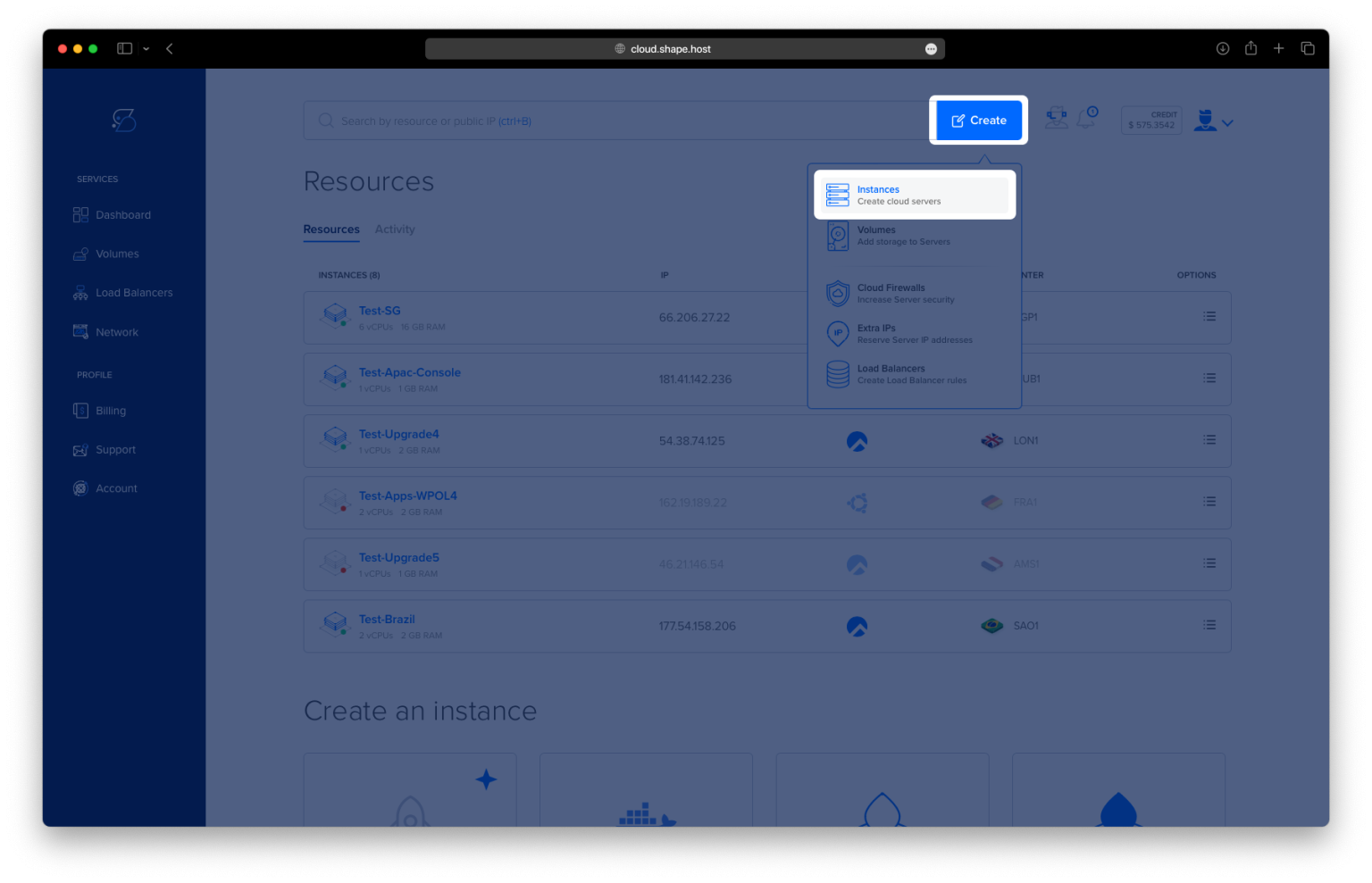
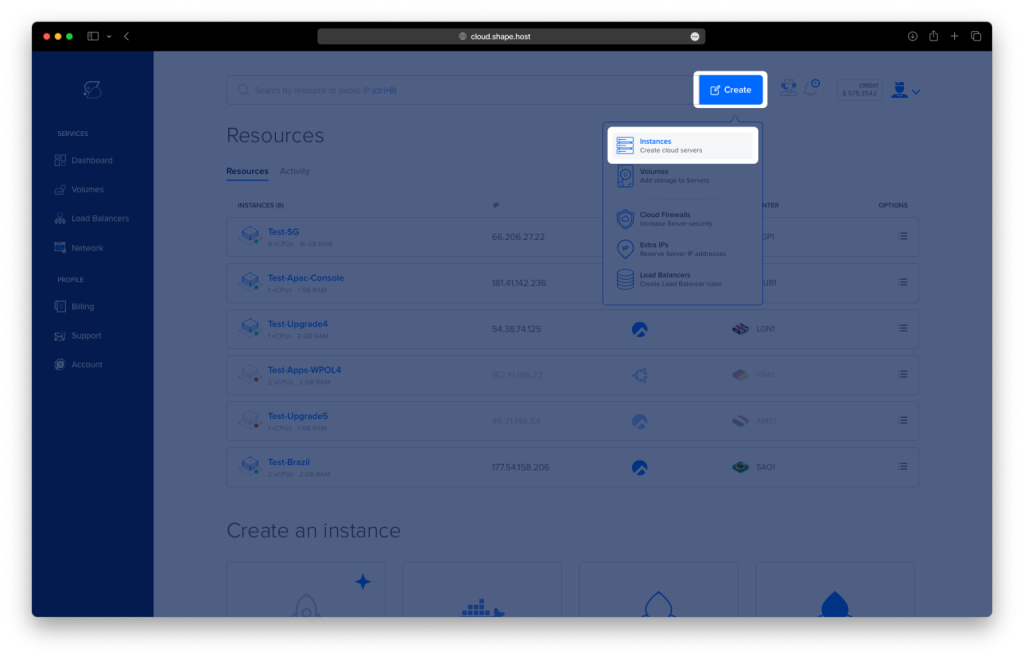
Click Create: Click on the “Create” button located in the top-right corner.
Select Instances: From the dropdown menu, choose “Instances” to create a new cloud server.
Select Location: Choose a data center location closest to your target audience for better performance.
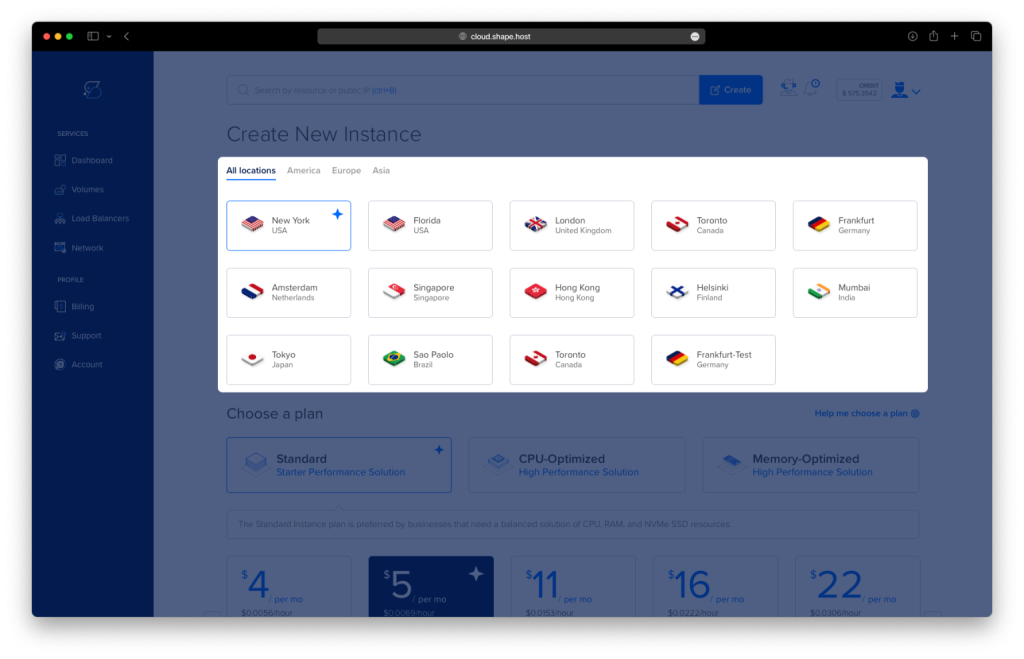
Choose a Plan: Select a server plan that fits your needs, such as Standard, CPU-Optimized, or Memory-Optimized.
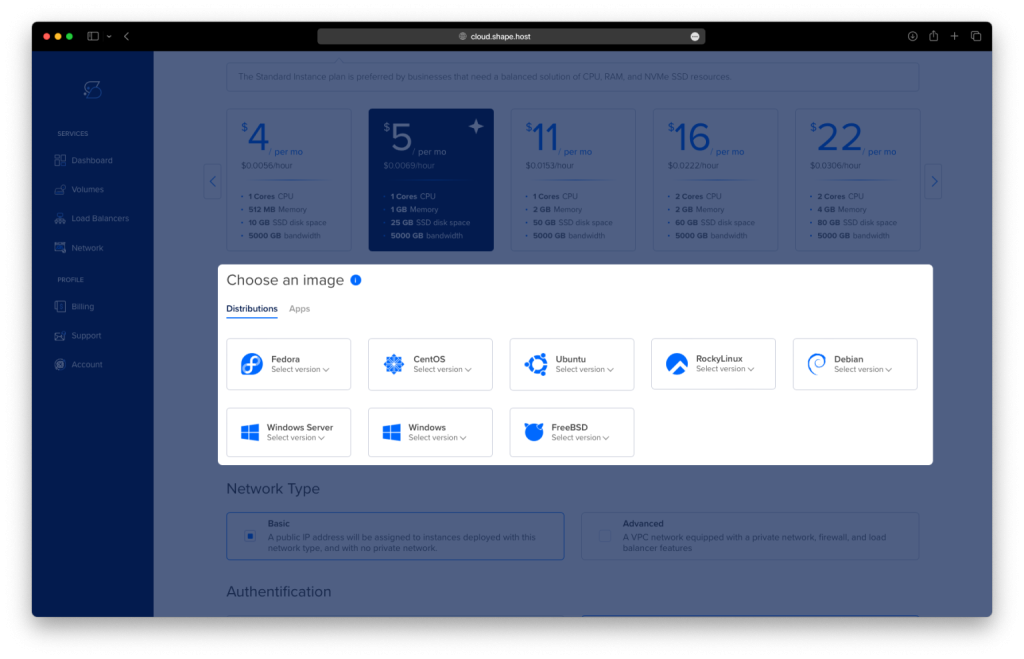
Choose an Image: Select Ubuntu 24.04 as the operating system.
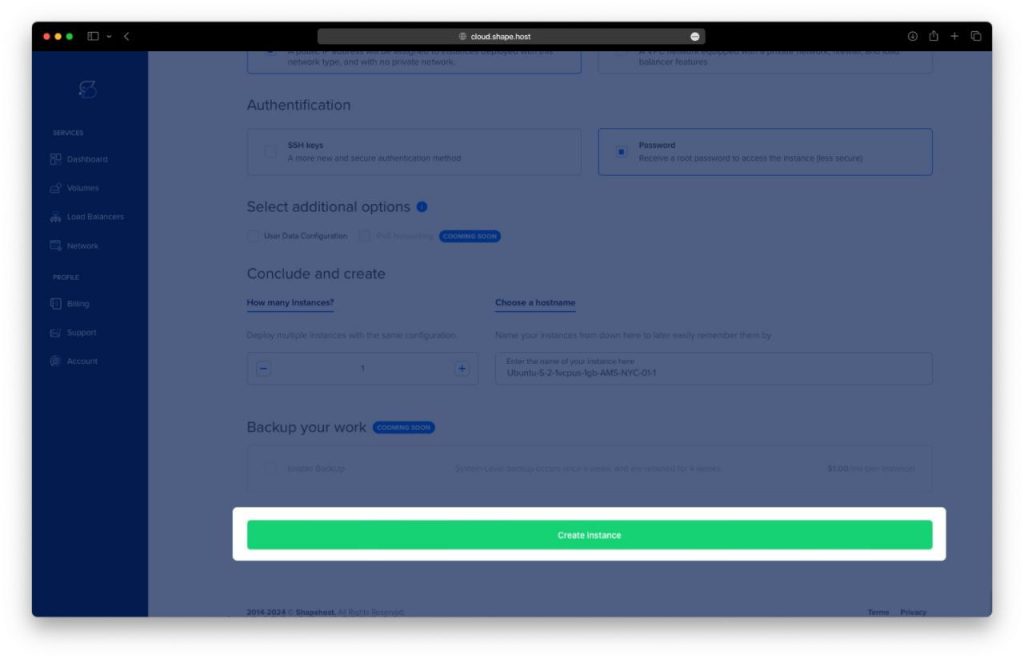
Authentication and Finalize: Choose your preferred authentication method, either SSH keys or password, and click Create Instance.
- Obtain IP Address
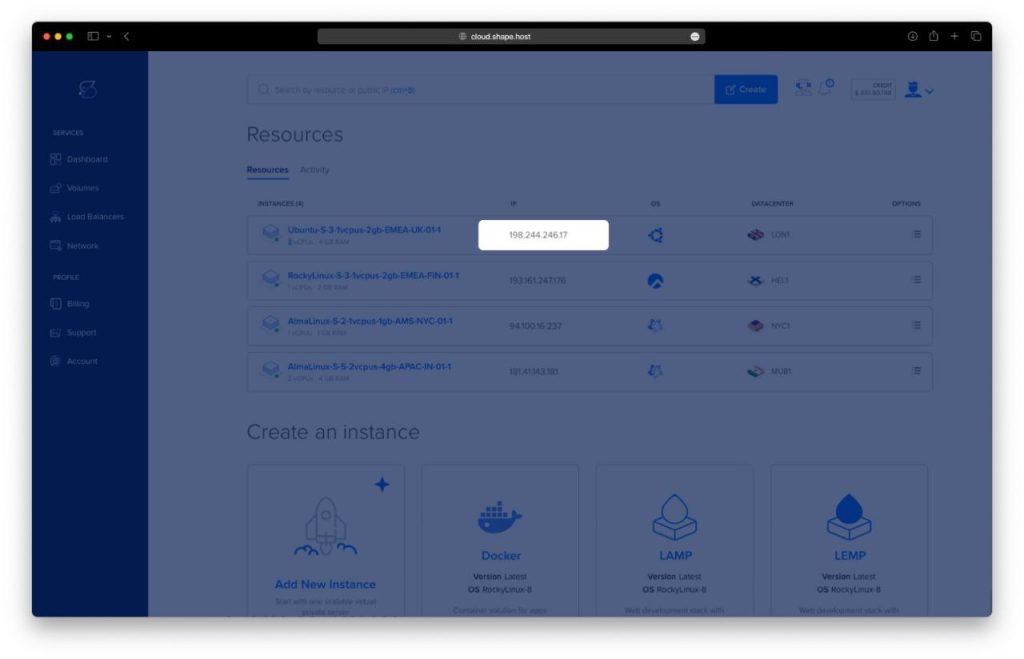
- Once your instance is created, return to the dashboard.
- Find your instance’s IP address under the Resources section and use it to access your server.
Step 2: Connect to Your Instance
Once your instance is ready, connect to it using SSH:
- Linux/macOS: Open a terminal and use:
ssh root@<your_server_ip> - Windows: Use PuTTY. Enter the server’s IP, select SSH, and log in as
rootwith the password or key you configured.
Step 3: Update and Upgrade Your System
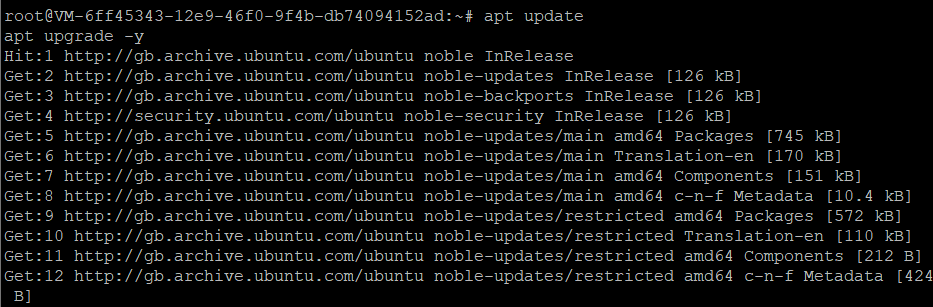
Ensure your system is updated before proceeding with the installation:
apt update
apt upgrade -y
Step 4: Install Required Tools
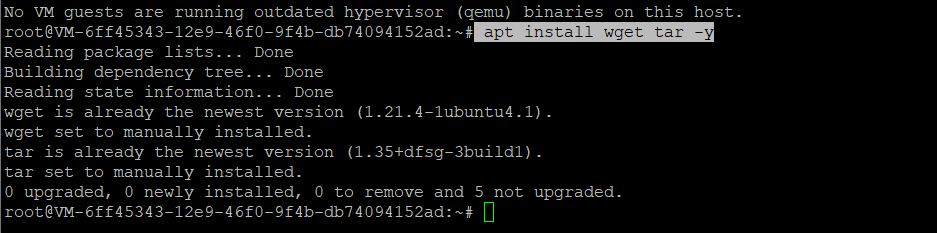
Install wget and tar, which are necessary for downloading and extracting Julia:
apt install wget tar -y
Step 5: Download and Extract Julia
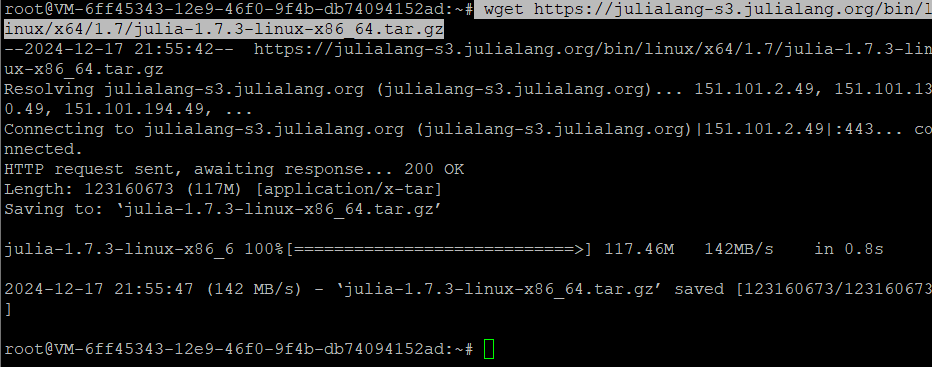
Download the Julia binary archive (version 1.7.3) using the wget command:
wget https://julialang-s3.julialang.org/bin/linux/x64/1.7/julia-1.7.3-linux-x86_64.tar.gz
Extract the downloaded archive into the /opt/ directory:
tar -xvzf julia-1.7.3-linux-x86_64.tar.gz -C /opt/

Step 6: Create a Symbolic Link
Create a symbolic link to make Julia globally accessible from the terminal:
ln -s /opt/julia-1.7.3/bin/julia /usr/local/bin/julia

Step 7: Verify Julia Installation
To confirm that Julia has been installed successfully, check its version:
julia --version
You should see an output similar to:
julia version 1.7.3

Step 8: Start Julia
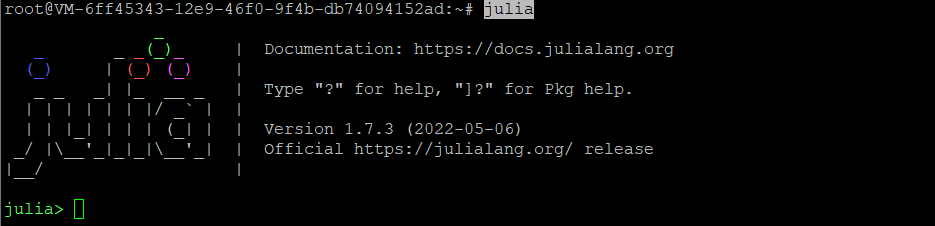
To launch the Julia REPL (interactive shell), simply type:
julia
You will see the Julia prompt:
julia>
You can now start running Julia commands or scripts. To exit the REPL, type:
exit()
You have successfully installed the Julia programming language on Ubuntu 24.04. Julia is now ready for high-performance numerical and scientific computing tasks.
For optimal performance and scalable hosting solutions tailored for development environments, consider Shape.Host Linux SSD VPS. Their robust infrastructure ensures smooth execution of your Julia-based projects.