What is Kamailio?
Kamailio is a robust, high-performance SIP (Session Initiation Protocol) server used for managing and routing SIP signaling in VoIP (Voice over IP), video, and real-time communication systems. It is open-source and designed for carrier-grade scalability, capable of handling tens of thousands of concurrent calls per second.
Running Kamailio on Debian 12 (Bookworm) is an excellent choice for organizations and developers building scalable, secure, and customizable communication infrastructure.
Core Features of Kamailio
SIP Proxy and Registrar
- Acts as a SIP proxy, location server, redirect server, and registrar.
- Manages SIP registration, authentication, call routing, and forwarding.
High Scalability and Performance
- Optimized to serve large-scale SIP networks with high throughput.
- Efficient memory usage and support for multi-threading and clustering.
NAT Traversal Support
- Handles clients behind NAT using RTPProxy, MediaProxy, STUN, or ICE.
- Ensures SIP and media flow even in complex network environments.
Flexible Routing Logic
- Powerful built-in configuration language and support for KEMI (Kamailio Embedded Interface) using languages like Lua, Python, and JavaScript.
- Enables advanced SIP routing and decision-making.
Security and Access Control
- Supports TLS encryption, digest authentication, IP filtering, and DoS protection.
- Can integrate with fail2ban, firewalls, and third-party authentication systems.
Database and Backend Integration
- Connects to MySQL, MariaDB, PostgreSQL, Redis, and SQLite.
- Used for user location, accounting, call detail records, and routing logic.
WebRTC Support
- WebSocket and TLS modules enable WebRTC signaling, useful for browsers and mobile clients.
- Often paired with RTPEngine or Janus for media handling.
Load Balancing and High Availability
- Features like dispatcher module and clustering make it suitable for load balancing and distributed setups.
- Can be used as a front-end SIP router for Asterisk, FreeSWITCH, or other backends.
Why Use Kamailio on Debian 12?
Debian 12 is known for its stability, security, and long-term support, making it an ideal platform for deploying Kamailio in production environments.
Benefits include:
- Lightweight and clean base system
- Reliable performance on physical and virtual servers
- Access to up-to-date SIP modules and security patches
- Well-supported via Debian’s and Kamailio’s active communities
System Requirements for Kamailio on Debian 12
| Component | Minimum Requirement |
|---|---|
| OS | Debian 12 (Bookworm) |
| CPU | 1+ core (multi-core for high performance) |
| RAM | 512 MB (2 GB or more recommended) |
| Disk | ~200 MB (more for logs and media relays) |
| Network Ports | 5060/UDP, 5060/TCP, 5061/TLS (SIP), plus RTP relay ports |
| Dependencies | libssl, libmysqlclient, libpcre, systemd |
Kamailio handles signaling only, not media. For RTP streams, use RTPEngine, RTPProxy, or similar.
Common Use Cases
- SIP trunking gateway for ITSPs and enterprises
- SIP proxy front-end for PBX systems like Asterisk or FreeSWITCH
- VoIP load balancer for large deployments
- WebRTC signaling gateway
- IMS Core component for telecom environments
- Real-time communication backend for custom applications
Kamailio vs Other SIP Platforms
| Feature | Kamailio | OpenSIPS | Asterisk | FreeSWITCH |
|---|---|---|---|---|
| SIP Proxy Function | Yes | Yes | Partial | Partial |
| Media Handling | No | No | Yes | Yes |
| Performance | Very High | Very High | Moderate | Moderate |
| WebRTC Support | Yes | Yes | Limited | Yes |
| Routing Flexibility | Very High | Very High | Moderate | High |
| Scalability | Carrier-grade | Carrier-grade | Limited | Limited |
| Target Use Case | SIP signaling, routing | Similar | Full PBX | Multimedia/VoIP apps |
Security Considerations
- Enable TLS for encrypted SIP signaling
- Restrict access via firewall rules (
iptables,nftables,ufw) - Implement rate limiting and fail2ban to block brute-force attacks
- Use digest authentication, and optionally integrate with RADIUS or LDAP
- Secure external modules and protect the configuration directory
Pros of Kamailio on Debian 12
- Highly scalable and efficient signaling engine
- Modular and extensible via scripting or KEMI APIs
- Runs well on low-resource servers or high-availability clusters
- Active community and long-term Debian compatibility
- Ideal for carrier-grade VoIP infrastructure
Cons
- No media support out of the box (requires external tools)
- Steep learning curve for new users
- Configuration file syntax can be complex for beginners
- Requires understanding of SIP/RTP protocols and VoIP architecture
Kamailio SIP Server on Debian 12 is an exceptional choice for building custom, scalable, and secure VoIP infrastructure. Its performance and flexibility make it a preferred solution for service providers, telecom operators, and developers who require robust signaling capabilities and integration with other systems like Asterisk, FreeSWITCH, or WebRTC.
With Debian 12’s reliability and Kamailio’s feature-rich architecture, you can confidently deploy everything from simple SIP proxies to complex, multi-node, carrier-grade communication platforms.
Step 1: Create a Cloud VPS on Shape.Host
Go to https://shape.host and log in.
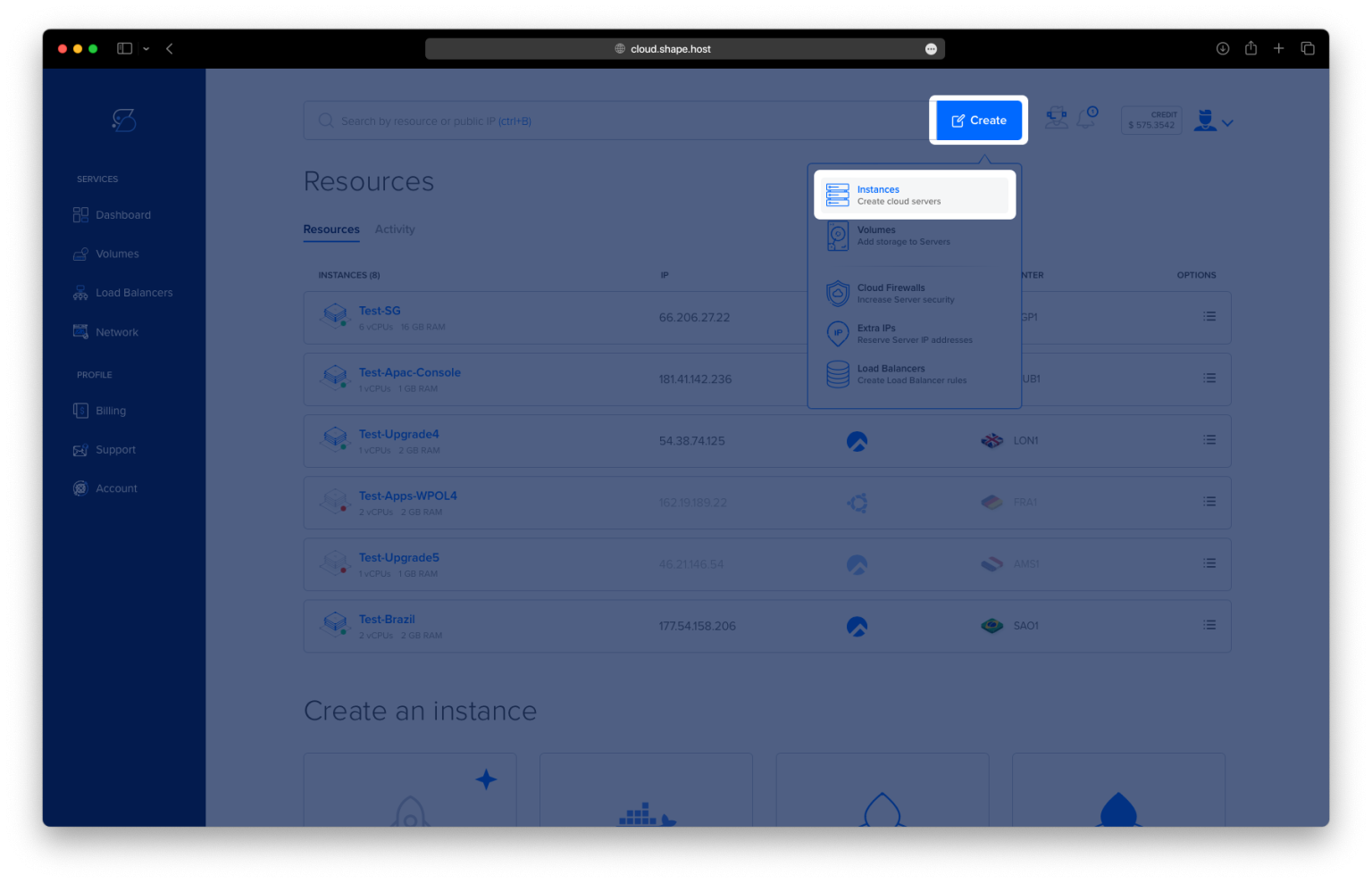
Click Create.
Choose Instance.

Select your preferred server location.

Choose Debian 12 (64-bit) as your OS.
Pick a plan with at least 2 CPUs, 4 GB RAM, and 20 GB SSD.

Click Create Instance.

Find your instance’s IP address under the Resources section.

Step 2: Connect to Your Server
Linux/macOS:
Open Terminal and run:
ssh root@your_server_ip
Windows:
Use PuTTY:
- Host:
your_server_ip - Port:
22, Type:SSH - Log in as
rootwhen prompted.
Step 3: Update Package Index
apt update
This refreshes your system’s list of available packages.

Step 4: Install MariaDB and GnuPG
apt install mariadb-server
apt install -y gnupg
MariaDB is used as Kamailio’s database backend. GnuPG is needed for verifying package keys.

Step 5: Add Kamailio’s GPG Key
wget -O /usr/share/keyrings/kamailio.gpg https://deb.kamailio.org/kamailiodebkey.gpg
This key allows your system to trust packages from the Kamailio repository.

Step 6: Add the Kamailio Repository
tee /etc/apt/sources.list.d/kamailio.list<<EOF
deb     http://deb.kamailio.org/kamailio60 noble main
deb-src http://deb.kamailio.org/kamailio60 noble main
EOF
Adds Kamailio 6.0 packages (for Ubuntu Noble, also compatible with Debian 12).

Step 7: Update Again for Kamailio Packages
apt update
This pulls in the Kamailio packages from the new repo.

Step 8: Install Kamailio and Required Modules
apt install kamailio kamailio-mysql-modules kamailio-websocket-modules kamailio-tls-modules
Installs the core SIP server and modules for MySQL, WebSocket, and TLS support.

Step 9: Verify Kamailio Version
kamailio -V
Confirms Kamailio was installed successfully and shows its version.

Step 10: Configure Kamailio Controller
nano /etc/kamailio/kamctlrc
Update or add these lines:
SIP_DOMAIN=srv1.example.com
DBENGINE=MYSQL
DBHOST=localhost
SIP_DOMAINis the domain or hostname of your server.DBENGINEtells Kamailio to use MySQL.DBHOSTshould remainlocalhostif the database is on the same machine.

Step 11: Initialize the Database
kamdbctl create
This sets up the required Kamailio tables inside your MariaDB server.


Step 12: Enable Core Features in Config
nano /etc/kamailio/kamailio.cfg
Just below #!KAMAILIO, add:
#!define WITH_MYSQL
#!define WITH_AUTH
#!define WITH_USRLOCDB
#!define WITH_ACCDB
This enables support for MySQL, user authentication, SIP user location, and accounting.

Step 13: Restart Kamailio
systemctl restart kamailio
Applies your changes and starts the Kamailio SIP service.
Step 14: Check Kamailio Status
systemctl status kamailio
Make sure the service is running without errors.

You now have Kamailio SIP Server running on Debian 12, with MySQL, authentication, and WebSocket/TLS modules ready for use.
This setup runs best on a reliable Cloud VPS from Shape.Host, with:
- Instant instance creation
- Full root access
- Fast, scalable hosting ideal for VoIP and real-time apps
Start building your SIP infrastructure today at https://shape.host