Neo4j on Ubuntu 24.04 – Graph Database at Scale on a Modern Linux Platform
Neo4j is a leading open-source, high-performance graph database designed to handle highly connected data and complex relationship queries with speed and scalability. It is widely used for use cases such as knowledge graphs, fraud detection, recommendation engines, and network analysis.
Running Neo4j on Ubuntu 24.04 LTS (Noble Numbat) provides a secure, stable, and long-term supported environment suitable for production deployments in enterprise, research, and real-time analytics systems.
What Makes Neo4j Unique?
Unlike traditional RDBMS or document databases, Neo4j uses the property graph model:
- Nodes represent entities
- Relationships connect nodes with direction and properties
- Cypher Query Language enables expressive, declarative graph queries
This model allows for O(1) traversal of relationships and efficient querying of deeply interconnected data, outperforming SQL joins in many graph-specific scenarios.
Ubuntu 24.04 Compatibility
Ubuntu 24.04 includes recent kernel and libc updates, as well as modern Java runtimes and systemd support, making it fully compatible with Neo4j 5.x and 4.x versions.
| Component | Compatibility with Neo4j |
|---|---|
| Java Runtime | OpenJDK 17 (Neo4j 5.x), OpenJDK 11 (Neo4j 4.x) |
| System Architecture | x86_64 (64-bit) |
| Service Manager | systemd native |
| Filesystem Support | Ext4, XFS, Btrfs (recommended: Ext4/XFS) |
| Networking | Compatible with clustering and Bolt/HTTP ports |
| AppArmor | Enabled by default; needs proper profile tuning for secure deployments |
Neo4j supports running in single-instance, high-availability, or clustered environments on Ubuntu 24.04.
Resource Planning and Performance Considerations
Neo4j is both memory- and I/O-intensive, depending on graph size and query complexity. Recommended server sizing:
| Use Case | CPU | RAM | Storage |
|---|---|---|---|
| Development | 2 cores | 4–8 GB | 20 GB SSD (minimum) |
| Mid-scale Graphs | 4–8 cores | 16–32 GB | SSD/NVMe, 100+ GB |
| Enterprise Graphs | 16+ cores | 64–256 GB | High-speed SSD/NVMe, RAID |
Neo4j uses an in-memory page cache to speed up query performance. The page cache should be set to consume ~50–70% of system memory (configurable in neo4j.conf).
Use Cases for Neo4j on Ubuntu 24.04
- Knowledge Graphs & Ontologies
- Linked data, semantic reasoning
- Fraud Detection & Anomaly Detection
- Behavioral pattern linking, suspicious activity
- Recommendation Engines
- Product/user similarity via graph traversals
- Network Topology Analysis
- IT, telecom, and cloud infrastructure graphs
- Master Data Management
- Entity resolution across systems
Ubuntu 24.04’s low overhead and kernel optimizations make it ideal for graph operations that require high-throughput and low-latency.
Protocols and Interfaces
| Access Layer | Description |
|---|---|
| Bolt | Native binary protocol (high-performance) |
| HTTP REST | For basic CRUD and legacy clients |
| Cypher Shell | CLI for running Cypher queries |
| Neo4j Browser | Web UI (port 7474) for visualization |
| Neo4j Desktop | Not for server use, but good for local dev |
| Drivers | Official for Java, Python, JavaScript, Go, .NET |
Security Considerations
Ubuntu 24.04 allows for hardened deployments with:
- TLS Encryption for Bolt and HTTPS endpoints
- Role-Based Access Control (RBAC) in Neo4j Enterprise
- Kerberos / LDAP Integration for SSO (Enterprise only)
- UFW / Nftables for firewalling exposed services
- AppArmor profiles to limit filesystem/network access
Ensure secure configuration by disabling default ports in public-facing environments and setting strong credentials in neo4j.conf.
Neo4j Editions
| Edition | Features |
|---|---|
| Community | Free, open source, single-instance only |
| Enterprise | Clustering, HA, security features, support |
| AuraDB | Fully managed Neo4j Cloud offering |
Ubuntu 24.04 can host both Community and Enterprise editions effectively. For clustering, ensure proper system clock sync (NTP), port access (5000–6000 range), and DNS setup.
Cypher Query Language Overview
Cypher allows for intuitive querying of graph structures. Example:
MATCH (a:Person)-[:FRIEND_OF]->(b:Person)
WHERE a.name = 'Alice'
RETURN b.name
This returns all friends of “Alice” by traversing the FRIEND_OF relationship — with performance linear to the number of directly connected nodes.
Monitoring and Integration
Neo4j supports Prometheus metrics, which can be scraped and visualized via Grafana. On Ubuntu 24.04, you can run these tools natively or in Docker containers alongside Neo4j.
Other integrations:
- Apache Kafka for streaming ingest
- Apache Spark via the Neo4j Connector
- Python/Flask, Node.js, or Django for building graph-backed apps
Deploying Neo4j on Ubuntu 24.04 gives you:
- Full compatibility with Java 17 and modern Linux kernel features
- Long-term support and stable platform for mission-critical graph workloads
- Secure and scalable runtime for both standalone and clustered deployments
- Access to a rich ecosystem of drivers, visual tools, and query interfaces
This combination makes Ubuntu 24.04 an excellent foundation for both development and enterprise-scale graph databases powered by Neo4j.
Step 1: Create an Ubuntu 24.04 Server on Shape.Host
Before starting the installation, deploy a fresh server on Shape.Host:
Log into your Shape.Host account at https://shape.host.
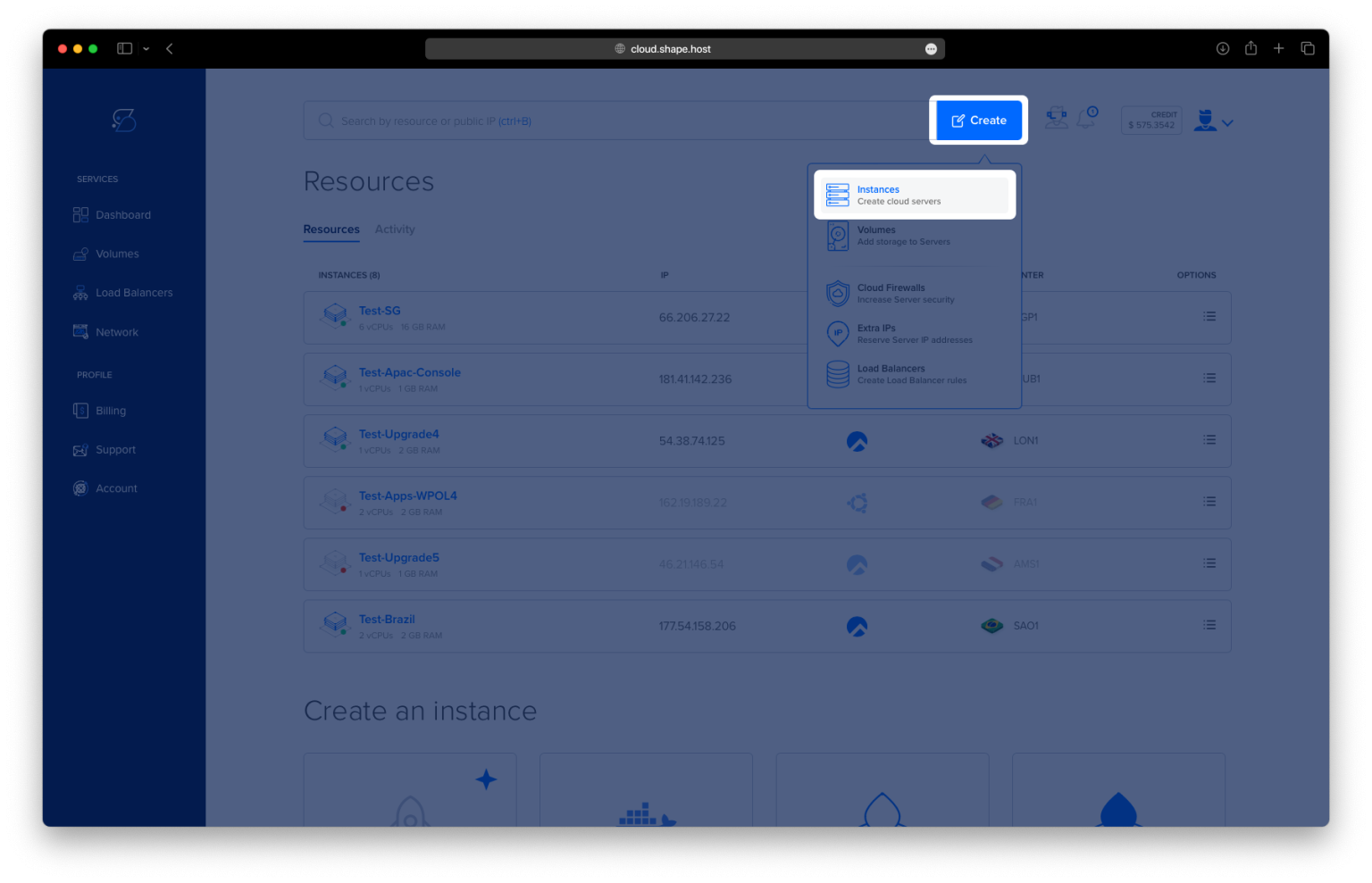
Click “Create”, then choose “Instance”.

Select the server location closest to your target users.

Choose Ubuntu 24.04 (64-bit) as the operating system.
Pick a server with at least 2 CPUs, 4 GB RAM, and 20 GB SSD.

Click “Create Instance”.

Once the server is deployed, note your IP address and login credentials.

Step 2: Connect to Your Server via SSH
From Linux/macOS:
ssh root@your-server-ip
From Windows:
Use PuTTY to connect to:
root@your-server-ip
Step 3: Install Java and Neo4j
3.1 Update the System
apt update

3.2 Install OpenJDK 17 (required by Neo4j 5)
apt install openjdk-17-jdk

3.3 Add the Neo4j GPG Key
wget -O - https://debian.neo4j.com/neotechnology.gpg.key | gpg --dearmor -o /usr/share/keyrings/neo4j.gpg
3.4 Add the Neo4j Repository
echo "deb [signed-by=/usr/share/keyrings/neo4j.gpg] https://debian.neo4j.com stable 5" > /etc/apt/sources.list.d/neo4j.list
3.5 Update Package Index Again
apt update

3.6 Install Neo4j
apt install neo4j

Step 4: Configure Neo4j to Accept External Connections
Edit the configuration file:
nano /etc/neo4j/neo4j.conf
Uncomment or add the following lines (replace your-ip with your actual server IP):
server.default_advertised_address=your-ip
server.http.listen_address=0.0.0.0:7474
server.bolt.listen_address=your-ip:7687
You can confirm your public IP with:
ip a | grep inet

Step 5: Start and Enable Neo4j
5.1 Enable Neo4j at Boot
systemctl enable neo4j
5.2 Start the Neo4j Service
systemctl start neo4j
5.3 Check Neo4j Status
systemctl status neo4j

5.4 Confirm Listening Port
ss -tulnp | grep 7474
You should see Neo4j listening on port 7474 (HTTP interface).

Step 6: Access the Neo4j Web Interface
Open your browser and visit:
http://your-server-ip:7474
Log in with:
- Username:
neo4j - Password: You’ll be prompted to set it on first login.


You’ve successfully installed and configured Neo4j 5 on Ubuntu 24.04 with external access. Neo4j is now ready to manage and explore your graph-based data.
For fast, secure cloud infrastructure that supports Neo4j and more, choose Shape.Host.
Launch your graph database with Shape.Host today — optimized Linux SSD VPS solutions for modern data platforms.