Paperless-ngx on Rocky Linux 9 (Docker Compose + PostgreSQL + Redis + Nginx + SSL)
Paperless-ngx is an advanced open-source document management system (DMS) that helps you digitize, organize, and manage your documents in a self-hosted environment. Using OCR (Optical Character Recognition), Paperless-ngx extracts text from scanned documents, making every word searchable and filterable. With support for email imports, smart tagging, multi-user access, and cloud integration, it provides a complete solution for anyone transitioning to a paperless workflow.
Running Paperless-ngx on Rocky Linux 9, a RHEL-compatible enterprise operating system, ensures long-term stability, enhanced security, and production-grade reliability. Combined with Docker Compose, PostgreSQL, Redis, Nginx, and SSL encryption, this stack delivers a secure, scalable, and easily maintainable DMS for home, business, and enterprise environments.
Architecture Overview
| Layer | Component | Role |
|---|---|---|
| OS | Rocky Linux 9 | RHEL-compatible enterprise-grade base OS |
| Container Runtime | Docker Engine + Compose | Orchestrates Paperless-ngx and its supporting services |
| Application | Paperless-ngx (Django) | Web-based document management system and OCR processor |
| Database | PostgreSQL 15 | Stores metadata, users, tags, and document references |
| Cache/Queue | Redis | Manages async background tasks and caching |
| Reverse Proxy | Nginx | Handles HTTPS, routing, and static content delivery |
| TLS | Let’s Encrypt / PKI | Provides SSL encryption for secure web access |
Why Use Paperless-ngx?
- Automated OCR – extract text from images and PDFs for full-text search.
- Smart classification – auto-tag, filter, and organize documents based on rules.
- Multi-user management – ideal for teams, families, or office environments.
- Email & folder import – ingest documents automatically from inboxes or watched directories.
- Fast search engine – instantly locate documents by keyword or metadata.
- Modern, responsive interface – manage your documents from any device.
- Private and self-hosted – total control over your data and storage.
Paperless-ngx vs Other Document Management Platforms
| Feature/Capability | Paperless-ngx (Self-hosted) | Mayan EDMS | Nextcloud | Zoho WorkDrive |
|---|---|---|---|---|
| Hosting | Self-hosted / Docker | Self-hosted | Cloud / Self-hosted | Cloud only |
| OCR Support | ✅ Yes | ✅ Yes | ❌ No | ❌ No |
| Auto Tagging | ✅ Yes | ✅ Limited | ❌ No | ✅ Partial |
| Multi-user Support | ✅ Yes | ✅ Yes | ✅ Yes | ✅ Yes |
| Privacy | 100% data control | 100% local | Partial | Cloud only |
| Cost | Free, open-source | Free | Free/Paid | Paid |
Paperless-ngx delivers the power and flexibility of enterprise document management with the simplicity and freedom of open-source software — making it the top choice for users seeking full data ownership and advanced automation.
Security & Best Practices
- Deploy behind Nginx with HTTPS (Let’s Encrypt or corporate SSL).
- Store credentials securely in
.envor Docker secrets. - Restrict PostgreSQL and Redis to internal Docker networks only.
- Enable SELinux enforcement for additional system protection.
- Use firewalld to allow only ports 80 and 443.
- Keep Rocky Linux, Docker, and Paperless-ngx images updated.
- Schedule automated PostgreSQL and media backups.
- Use Certbot or Traefik ACME for automated SSL renewals.
- Enforce file permissions and strong admin credentials.
Typical Use Cases
- Personal archives – manage invoices, receipts, and personal documents.
- Small businesses – streamline document workflows for invoices, contracts, and HR files.
- Law firms & accountants – create searchable, secure repositories for client documents.
- Educational institutions – digitize academic, financial, and administrative paperwork.
- Healthcare organizations – store and access records securely while maintaining compliance.
- Teams and organizations – centralize document access with granular user permissions.
Deploying Paperless-ngx on Rocky Linux 9 with Docker Compose, PostgreSQL, Redis, and Nginx provides a powerful, secure, and private document management platform — giving you complete control over your digital archive with enterprise-level scalability and open-source flexibility.
Create a Cloud Server Instance on Shape.Host
To run Paperless-ngx smoothly, you need a clean Rocky Linux 9 VPS.
Here is how to create one using Shape.Host Cloud VPS:
Visit https://shape.host and sign in.
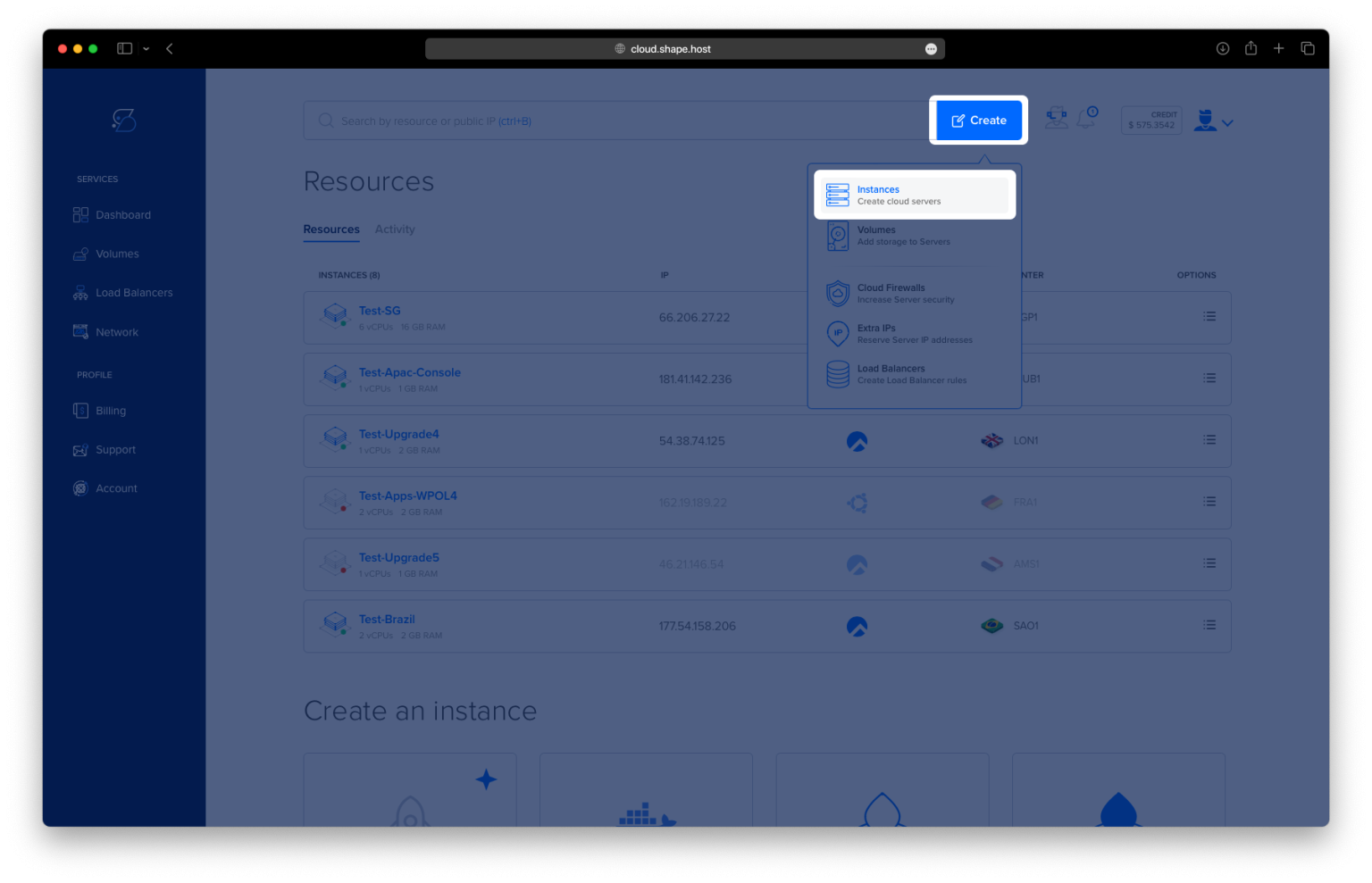
Click “Create” (top-right corner).
Select “Instance.”

Pick your server location — choose the closest region for best latency.

Under the operating system list, select Rocky Linux 9 (64-bit).
Choose a plan — recommended minimum:
2 vCPUs
4 GB RAM
20 GB NVMe/SSD storage

Click Create Instance.
Wait 20–40 seconds for deployment.

Copy the VPS public IP address from the dashboard.
Your Rocky Linux 9 server is now ready for installation.

Connect to Your Server
Linux/macOS
ssh root@your_server_ip
This logs you into the remote server.
Windows
Use PuTTY and connect as root.
Step 1: Update the System
dnf update
Refreshes all system packages and installs the latest security updates.

Step 2: Install Required Tools
dnf install curl git tar
These utilities are essential:
- curl → downloads files
- git → used in case you need to clone repositories
- tar → extracts compressed archives

Step 3: Add the Official Docker Repository
dnf config-manager --add-repo https://download.docker.com/linux/centos/docker-ce.repo
This adds Docker’s official repo for CentOS/Rocky Linux so you can install the latest Docker version.
Step 4: Install Docker Engine + Docker Compose
dnf install docker-ce docker-ce-cli containerd.io docker-buildx-plugin docker-compose-plugin
This installs:
- Docker Engine
- Docker CLI tools
- containerd
- Buildx for building images
- Docker Compose v2 (
docker compose)

Step 5: Enable Docker at Boot
systemctl enable docker
Ensures Docker starts automatically whenever the system boots.
Step 6: Start Docker
systemctl start docker
Starts the Docker service immediately.
Step 7: Verify Docker Compose Installation
docker compose version
If this prints a version number, Docker Compose is correctly installed.
Step 8: Create the Paperless-ngx Directory
mkdir -p /opt/paperless
Creates the main application directory.
Step 9: Enter the Directory
cd /opt/paperless

Step 10: Generate a Secure SECRET_KEY
openssl rand -base64 32
Copy the generated key — you will paste it into the Docker Compose file.

Step 11: Create the Docker Compose File
nano /opt/paperless/docker-compose.yml
Paste your exact configuration:
services:

  redis:
    image: redis:7
    container_name: paperless_redis
    restart: unless-stopped

  db:
    image: postgres:15
    container_name: paperless_db
    restart: unless-stopped
    environment:
      POSTGRES_DB: paperless
      POSTGRES_USER: paperless
      POSTGRES_PASSWORD: strongpassword
    volumes:
      - db-data:/var/lib/postgresql/data

  webserver:
    image: ghcr.io/paperless-ngx/paperless-ngx:latest
    container_name: paperless_web
    depends_on:
      - db
      - redis
    ports:
      - "8000:8000"
    restart: unless-stopped
    environment:
      PAPERLESS_REDIS: redis://redis:6379
      PAPERLESS_DBHOST: db
      PAPERLESS_DBNAME: paperless
      PAPERLESS_DBUSER: paperless
      PAPERLESS_DBPASS: strongpassword
      PAPERLESS_SECRET_KEY: "PASTE_YOUR_SECRET_KEY_HERE"
      PAPERLESS_URL: "https://your-domain.com"
      PAPERLESS_TIME_ZONE: "Europe/Bucharest"
    volumes:
      - data:/usr/src/paperless/data
      - media:/usr/src/paperless/media
      - consume:/usr/src/paperless/consume

volumes:
  db-data:
  data:
  media:
  consume:
What each service does:
- redis → handles background tasks
- postgres db → stores document metadata
- paperless_web → the main Paperless-ngx application
- volumes → persistent storage for your files and database
Save the file:
CTRL + O → ENTER → CTRL + X

Step 12: Start the Services
docker compose up -d
This launches Paperless-ngx, Redis, and PostgreSQL in the background.

Step 13: Check Running Containers
docker ps
You should see:
paperless_webpaperless_dbpaperless_redis
all marked as Up.

Step 14: Access Paperless-ngx in Your Browser
Visit:
http://YOUR_SERVER_IP:8000
Paperless-ngx is now running!


Self-hosting applications like Paperless-ngx requires strong performance, reliability, and modern virtual machines.
Shape.Host provides:
- High-performance NVMe servers
- Fast deployment of new instances
- Multiple global data centers
- Optimized OS images for Docker workloads
- Affordable pricing and excellent uptime
For a smooth and professional hosting experience, run your Docker-based applications on Shape.Host Linux SSD VPS.