CherryPy on Debian 12 (Python + WSGI + Nginx + SSL)
CherryPy is a minimalist yet production-ready Python web framework that comes with its own embedded HTTP server. Unlike full-stack frameworks such as Django or Flask, CherryPy focuses on simplicity and speed, letting developers structure applications however they like while still offering built-in tools like session management, caching, and static file serving. It’s a solid choice for lightweight services, APIs, and embedded web applications where performance and control matter.
Running CherryPy on Debian 12 (Bookworm) provides a stable, secure, and long-term supported foundation. Debian’s well-known reliability, combined with systemd 252, OpenSSL 3, and Python 3.11, makes it an excellent choice for deploying production-ready CherryPy apps behind Nginx with SSL termination.
Architecture Overview
| Layer | Component | Role |
|---|---|---|
| OS | Debian 12 (Bookworm) | Stable, long-term supported Linux base |
| Runtime | Python 3.11 + venv | Executes the CherryPy application in an isolated environment |
| Framework | CherryPy (WSGI server) | Lightweight Python HTTP server and web framework |
| Process Manager | systemd | Keeps CherryPy running, handles restarts, logs, and uptime |
| Reverse Proxy | Nginx | TLS termination, request routing, compression, caching |
| TLS | Let’s Encrypt / PKI | Provides secure HTTPS for public-facing applications |
Why Use CherryPy?
- Minimal & efficient – no overhead, just the essentials for serving Python apps.
- Flexible integration – works well with ORMs, template engines, or any Python libraries.
- Mature & stable – around since 2002, proven in production.
- Object-oriented style – easy to structure applications cleanly.
- Embeddable – perfect for integrating into larger Python projects.
CherryPy vs Other Python Frameworks
| Feature/Capability | CherryPy | Flask | Django | FastAPI |
|---|---|---|---|---|
| Approach | Minimal HTTP + WSGI | Microframework | Full-stack framework | Async API-first |
| HTTP server | Built-in | Requires WSGI server | Requires WSGI server | ASGI (uvicorn) |
| Complexity | Low | Low | High | Medium |
| Best use case | Lightweight APIs | Prototyping APIs | Enterprise web apps | Async microservices |
CherryPy is strongest when you want a simple, fast, and no-frills framework that doesn’t force architectural choices.
Security & Best Practices
- Deploy behind Nginx with HTTPS enabled.
- Run under a dedicated non-root system user.
- Use Python virtual environments to isolate dependencies.
- Configure systemd service files for process management and uptime.
- Regularly patch Debian, Python, and CherryPy dependencies.
- Add security headers in Nginx (HSTS, CSP, Referrer-Policy, etc.).
Typical Use Cases
- Building REST APIs for internal or public use.
- Hosting lightweight dashboards or admin tools.
- Embedding a web service inside a larger Python project.
- Prototyping applications quickly without heavy frameworks.
- Deploying secure services behind SSL in production.
Step 1: Create a Server Instance on Shape.Host
First, you need a Debian 12 server. Here’s how to set one up with Shape.Host:
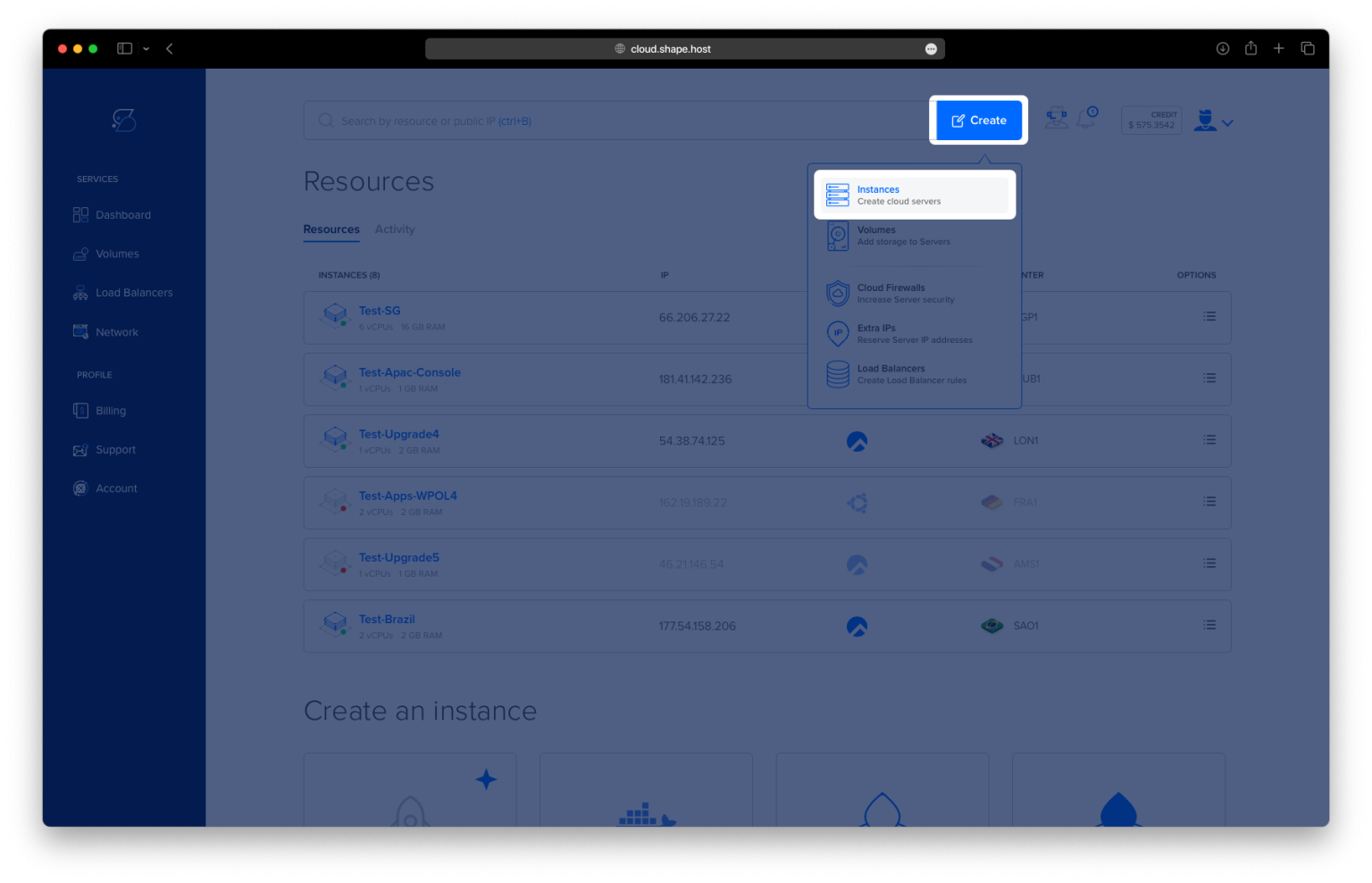
Log in to your Shape.Host dashboard.
Click Create → Instance.

Select your preferred data center location.

Choose a plan with at least 2 CPUs, 2 GB RAM, and 20 GB SSD.
Pick Debian 12 (64-bit) as the operating system.

Click Create Instance.

Copy the server’s IP address from the Resources section.

Step 2: Connect to Your Server
- Linux/macOS:
ssh root@your_server_ip - Windows (with PuTTY):
- Download PuTTY.
- Enter the server IP, select SSH, and click Open.
- Log in using your Shape.Host root credentials.
Step 3: Install Required Packages
apt update
apt upgrade
apt install python3 python3-venv python3-pip nginx
Updates system packages, then installs Python, virtual environment tools, pip, and Nginx.


Step 4: Create a Dedicated User and App Directory
adduser --system --group --no-create-home cherrypy
mkdir -p /opt/myapp
Creates a system user cherrypy (no login shell) and an application directory.
Step 5: Set Up Virtual Environment and Install CherryPy
python3 -m venv /opt/myapp/venv
/opt/myapp/venv/bin/pip install --upgrade pip
/opt/myapp/venv/bin/pip install cherrypy
Creates an isolated Python environment and installs CherryPy.

Step 6: Create the Application
cat >/opt/myapp/app.py <<'PY'
import cherrypy

class App:
    @cherrypy.expose
    def index(self):
        return "Hello from CherryPy behind Nginx (Debian 12)!"

def main():
    cherrypy.config.update({
        "server.socket_host": "127.0.0.1",
        "server.socket_port": 8000,
        "engine.autoreload.on": False
    })
    cherrypy.quickstart(App(), "/")

if __name__ == "__main__":
    main()
PY
This app returns a simple message when accessed at /.
Step 7: Set Ownership and Test App Manually
chown -R cherrypy:cherrypy /opt/myapp
Ensures the cherrypy user owns the app directory.

Quick test:
runuser -u cherrypy -- /opt/myapp/venv/bin/python /opt/myapp/app.py &
sleep 1
curl -v http://127.0.0.1:8000/ || true
pkill -f /opt/myapp/app.py || true
Starts the app temporarily, checks output, then stops it.

Step 8: Create a systemd Service
cat >/etc/systemd/system/cherrypy.service <<'UNIT'
[Unit]
Description=CherryPy WSGI App
After=network-online.target
Wants=network-online.target

[Service]
Type=simple
User=cherrypy
Group=cherrypy
WorkingDirectory=/opt/myapp
ExecStart=/opt/myapp/venv/bin/python -u /opt/myapp/app.py
Environment=PATH=/opt/myapp/venv/bin
Environment=HOME=/opt/myapp
Restart=always
RestartSec=2
StandardOutput=journal
StandardError=journal
UMask=0022
NoNewPrivileges=true

[Install]
WantedBy=multi-user.target
UNIT
Enable and start the service:
systemctl daemon-reload
systemctl enable cherrypy
systemctl restart cherrypy
systemctl status cherrypy --no-pager -l

Check that it’s running:
ss -tlnp | grep ':8000' || true
curl -v http://127.0.0.1:8000/

Step 9: Configure Nginx as Reverse Proxy
cat >/etc/nginx/sites-available/myapp <<'NGINX'
server {
    listen 80;
    server_name debian-tutorials.shape.host;

    client_max_body_size 20M;

    location / {
        proxy_pass http://127.0.0.1:8000;
        proxy_http_version 1.1;
        proxy_set_header Host $host;
        proxy_set_header X-Forwarded-Proto $scheme;
        proxy_set_header X-Forwarded-For $proxy_add_x_forwarded_for;
        proxy_set_header Connection "";
        proxy_read_timeout 300;
    }

    access_log /var/log/nginx/myapp_access.log;
    error_log  /var/log/nginx/myapp_error.log;
}
NGINX
Enable and test config:
ln -sf /etc/nginx/sites-available/myapp /etc/nginx/sites-enabled/myapp
rm -f /etc/nginx/sites-enabled/default
nginx -t
systemctl reload nginx

Step 10: Enable SSL with Certbot
apt install certbot python3-certbot-nginx
certbot --nginx -d debian-tutorials.shape.host
This will fetch and configure a free Let’s Encrypt SSL certificate.


Now visit:
https://debian-tutorials.shape.host
You should see:
Hello from CherryPy behind Nginx (Debian 12)!

You’ve successfully deployed CherryPy on Debian 12 with systemd service management and Nginx as a reverse proxy secured by SSL. This lightweight, production-ready setup is suitable for small applications and APIs.
For reliable hosting and scalability, run your CherryPy applications on Shape.Host Linux SSD VPS — optimized for developers and high-performance workloads.