ionCube Loader on Debian 12 – Runtime Support for Encrypted PHP Applications
ionCube Loader is a proprietary PHP extension that enables execution of PHP files encrypted or obfuscated using the ionCube Encoder. It’s commonly required by commercial PHP applications, such as billing systems, licensing servers, and proprietary CMS modules. On Debian 12, it runs efficiently thanks to the system’s stability, package management, and broad support for PHP versions.
What is ionCube Loader?
ionCube Loader is a runtime decoder that integrates into PHP to transparently execute precompiled .php files protected by ionCube Encoder. This makes it an essential runtime component when deploying:
- Commercial PHP software (e.g., WHMCS, Blesta, BoxBilling)
- PHP applications with license enforcement
- Source-protected custom software used in multi-client or hosting environments
Supported PHP Versions on Debian 12
Debian 12 includes PHP 8.2 as its default, with optional versions like PHP 8.1 and 8.0 available via third-party repositories such as Sury’s PHP repository. ionCube Loader (as of mid-2025) officially supports up to PHP 8.2.
| PHP Version | Status with ionCube Loader (v13.0+) |
|---|---|
| PHP 8.2 | ✅ Supported |
| PHP 8.1 | ✅ Supported |
| PHP 8.0 | ✅ Supported |
| PHP 8.3 | ❌ Not yet supported (as of July 2025) |
When deploying on Debian 12, ensure the PHP version matches the loader version available at ioncube.com/loaders.
Technical Overview
- Architecture Support: x86_64 (64-bit) only
- Thread Safety: Separate loaders for ZTS (Thread Safe) and non-ZTS (most common) builds
- Web Server Compatibility: Works with Apache2 (mod_php or PHP-FPM) and Nginx (via PHP-FPM)
- CLI Support: Loader can be enabled for command-line PHP tasks (e.g., cronjobs, CLI scripts)
Debian’s modular PHP configuration (/etc/php/<version>/cli/conf.d/ and apache2/conf.d/) makes it easy to apply ionCube Loader only where needed.
Use Cases
- Web Hosting Platforms – Shared or VPS hosting environments that support encrypted applications
- Licensed Commercial Software – WHMCS, encrypted plugins, or modules that are delivered as
.php/.incencoded files - Code Protection – Agencies or developers who want to distribute obfuscated PHP while preserving licensing and support models
- Enterprise Applications – Internal tools with sensitive logic or intellectual property
Performance and Security Considerations
- Minimal Performance Overhead: Typically negligible in real-world usage
- Secure Execution: Code is decrypted in memory and never written to disk in plain text
- OPcache Compatible: Works alongside PHP OPcache, though precompiled files are excluded from caching
- Licensing Controls: Enforced via encoded license files, domains, IP bindings, or expiry dates
Integration with Debian 12 Services
| Service / Feature | Relevance for ionCube Loader |
|---|---|
| Apache 2.4 / Nginx 1.22 | Fully compatible web servers |
| PHP-FPM | Recommended handler for performance and flexibility |
| systemd | Ideal for managing PHP-FPM pools with custom loader configs |
| SELinux / AppArmor | Can be configured to permit encrypted execution securely |
| APT-based ecosystem | Smooth updates and easy control of PHP versions via update-alternatives |
Debian’s security model and predictable upgrade paths ensure a stable environment for long-term deployments of ionCube-based software.
Alternatives to ionCube
| Feature | ionCube Loader | SourceGuardian | Zend Guard (EOL) |
|---|---|---|---|
| PHP Support (2025) | PHP 5.6–8.2 | PHP 5.6–8.2 | Up to PHP 5.6 only |
| License Enforcement | Yes | Yes | Yes |
| Free Runtime Loader | Yes | Yes | Yes |
| Performance | High | Comparable | Obsolete |
ionCube remains the industry leader in PHP code protection and licensing, especially for PHP 7.x and 8.x applications.
Deploying ionCube Loader on Debian 12 provides a robust, secure, and reliable runtime for encrypted PHP applications. It’s ideal for:
- Web hosts and VPS providers supporting commercial PHP apps
- Businesses deploying proprietary internal tools
- Developers distributing licensed software without exposing source code
- Scenarios where PHP 8.0–8.2 compatibility is critical
Debian’s long support cycle, predictable behavior, and secure packaging model make it a preferred OS for hosting ionCube-powered applications in 2025 and beyond.
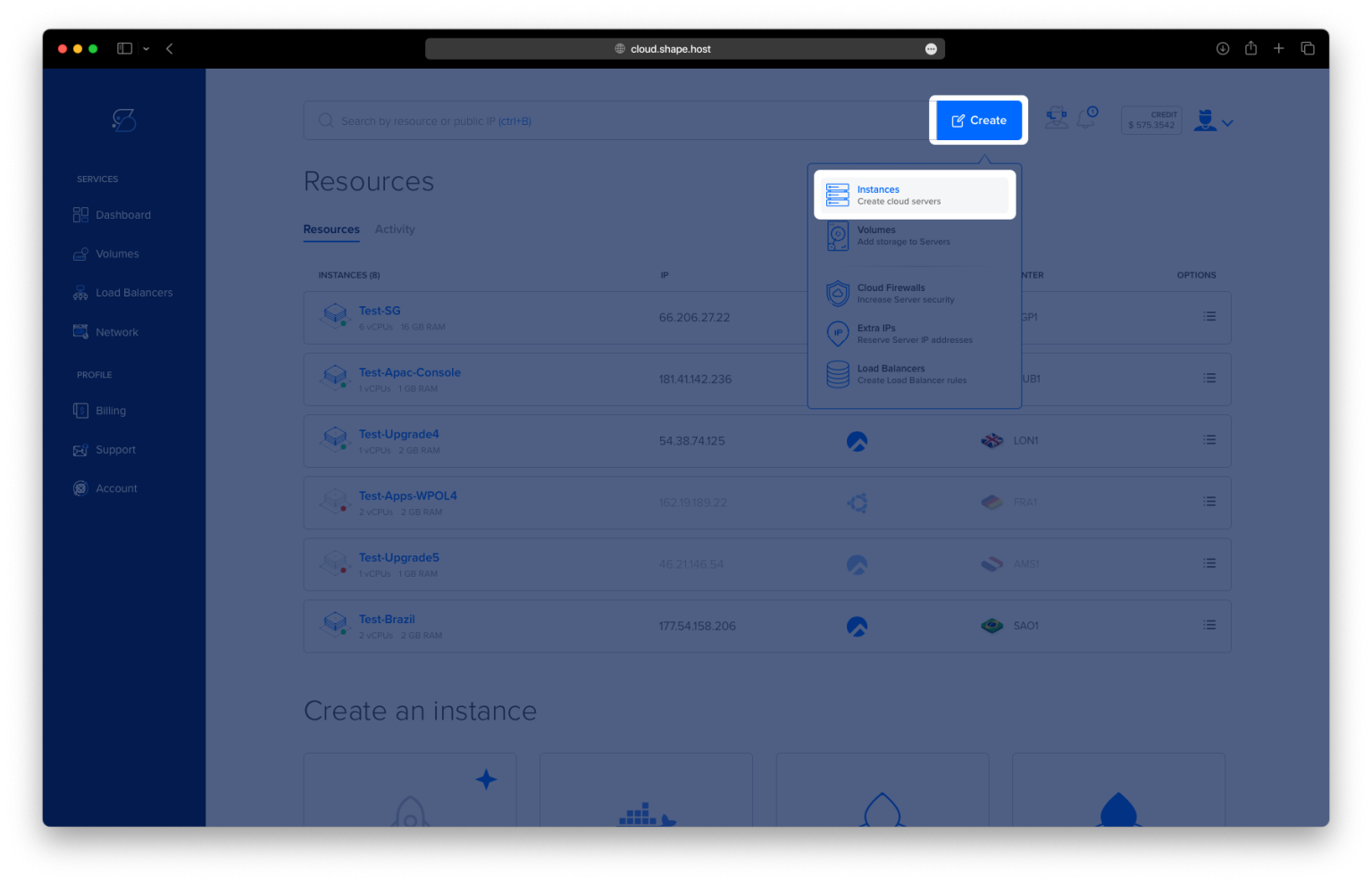
Step 1: Deploy a Debian 12 Server on Shape.Host
To begin, you’ll need a clean server running Debian 12. Here’s how to launch one using Shape.Host:
Go to https://shape.host and log into your account.
Click “Create” and select “Instance”.

Choose your preferred data center location.

Select Debian 12 (64-bit) as your OS.
Pick a server plan (minimum recommended: 2 CPUs, 2 GB RAM, and 20 GB SSD).

Click “Create Instance”.

After provisioning, copy the instance’s IP address and login credentials.

Step 2: Connect to Your Server via SSH
From Linux/macOS:
ssh root@your-server-ip
From Windows:
Use PuTTY, enter root@your-server-ip, and click Open.
Replace
your-server-ipwith your server’s actual IP address.
Step 3: Install Apache and PHP 8.3 with Extensions
3.1 Update the Package Index
apt update
Refreshes the list of available packages.

3.2 Install Apache, PHP 8.3, and Required Extensions
apt install apache2 php php-cli php-common php-mysql php-xml php-mbstring php-curl php-zip php-gd libapache2-mod-php unzip wget nano
Installs Apache, PHP 8.3 (default in Debian 12), and essential PHP modules required for most applications.

3.3 Enable and Start Apache
systemctl enable apache2
Ensures Apache starts at boot.
systemctl start apache2
Starts the Apache service now.

3.4 Confirm PHP Installation
php -v

Displays PHP version.
php -i | grep extension_dir
Outputs the path where PHP extensions are stored. Note this path for the ionCube loader.

Step 4: Install ionCube Loader for PHP 8.3
4.1 Download and Extract ionCube
cd /opt
wget https://downloads.ioncube.com/loader_downloads/ioncube_loaders_lin_x86-64.tar.gz
tar -xzf ioncube_loaders_lin_x86-64.tar.gz
This downloads and unpacks the latest ionCube loaders.

4.2 Copy the Loader for PHP 8.2 (used by default in Debian 12)
cd ioncube
cp ioncube_loader_lin_8.2.so /usr/lib/php/20220829/
📝 Replace the path
/usr/lib/php/20220829/if your extension directory is different (check using step 3.4).

4.3 Enable ionCube for Apache
nano /etc/php/8.2/apache2/conf.d/00-ioncube.ini
Add this line:
zend_extension=/usr/lib/php/20220829/ioncube_loader_lin_8.2.so
Save and exit.

4.4 Enable ionCube for CLI (optional but recommended)
nano /etc/php/8.2/cli/conf.d/00-ioncube.ini
Add the same line:
zend_extension=/usr/lib/php/20220829/ioncube_loader_lin_8.2.so
4.5 Restart Apache
systemctl restart apache2
Applies the ionCube loader changes.

Step 5: Verify ionCube Installation
5.1 Create a Test PHP Info File
echo "<?php phpinfo(); ?>" > /var/www/html/info.php
Visit:
http://your-server-ip/info.php
Look for the ionCube section to confirm that it’s active.

5.2 Clean Up
rm /var/www/html/info.php
rm -rf /opt/ioncube*
Removes the test file and ionCube installer.
You’ve now installed Apache, PHP 8.2 (default in Debian 12), and the ionCube Loader on your server. This setup supports encrypted PHP applications and is ideal for hosting commercial scripts.
For fast, scalable Cloud VPS hosting — optimized for PHP — Shape.Host is the ideal solution.
Get started now at Shape.Host and deploy your next PHP project with ease.