Apache Spark on Ubuntu 24.04 – Modern Data Processing on a Secure and Optimized Linux Platform
Apache Spark is a powerful open-source engine for large-scale data processing. It enables fast computation of massive datasets using distributed memory-based architecture, and supports a wide range of use cases—from ETL and real-time analytics to machine learning and graph processing.
Running Spark on Ubuntu 24.04 “Noble Numbat”, the latest long-term support (LTS) release of Ubuntu, brings together Spark’s processing power and the modern stability, security, and ecosystem support of the Ubuntu Linux platform.
What Is Apache Spark?
Apache Spark provides an advanced analytics engine for processing large-scale data in a distributed fashion. It improves upon traditional MapReduce with in-memory computation, fault tolerance, and APIs in Scala, Python (PySpark), Java, and R.
Key Spark Modules:
- Spark Core: Basic engine handling job execution, memory management, fault tolerance
- Spark SQL: Structured data querying via SQL and DataFrames
- Spark Streaming: Stream processing using micro-batch or continuous mode
- MLlib: Built-in library for scalable machine learning
- GraphX: Graph processing and analytics module
Why Ubuntu 24.04 Is a Great Choice for Apache Spark
Ubuntu 24.04 introduces the latest LTS platform with 5 years of security support, optimized performance, and modern development toolchains. For Spark deployments, it provides:
| Feature | Benefit for Spark |
|---|---|
| OpenJDK 21 | Fully compatible with Spark 3.5+, improves garbage collection and startup |
| Python 3.12 | Native support for latest PySpark features and dependencies |
| Systemd v253 | Better service control for Spark daemons (Master, Workers, History Server) |
| Linux Kernel 6.8+ | Enhances I/O throughput, memory scheduling, and NUMA balancing |
| apt with Snap integration | Simplifies dependency isolation and version pinning |
Ubuntu’s extensive community and enterprise adoption make it a reliable OS for running production-grade Spark clusters.
Spark Deployment Models on Ubuntu 24.04
Apache Spark supports multiple deployment topologies:
| Mode | Description |
|---|---|
| Standalone | Spark runs its own cluster manager. Easy and fast to set up on Ubuntu. |
| YARN | For Hadoop users; Spark jobs run under the Hadoop ResourceManager. |
| Kubernetes | For containerized environments; Spark runs in pods across a K8s cluster. |
| Local Mode | Single-node development mode. Great for testing and notebooks. |
On Ubuntu 24.04, all modes are viable with proper Java, Python, and networking setup.
Common Use Cases for Spark on Ubuntu
- Big Data ETL: Parallel transformations, joins, and aggregations of large datasets
- Real-Time Analytics: Analyze Kafka streams or log pipelines using Spark Streaming
- Machine Learning: Train scalable models using MLlib or integrate with external ML libraries
- Data Warehousing: Combine Spark SQL with Hive, Delta Lake, or Apache Iceberg
- Data Science Pipelines: Integrate with Jupyter or Zeppelin for interactive exploration
Spark + Ubuntu 24.04 Technology Stack
| Component | Technology |
|---|---|
| OS | Ubuntu 24.04 LTS |
| Java Runtime | OpenJDK 17/21 |
| Python | Python 3.12 (via PySpark) |
| Cluster Mode | Standalone / YARN / Kubernetes |
| Web Server | NGINX / HAProxy (for UI proxying) |
| Monitoring | Spark UI / Prometheus + Grafana |
| Storage | HDFS, S3, Ceph, or local disk |
Advantages of Running Spark on Ubuntu 24.04
- ✅ LTS Kernel and Libraries: Secure, stable environment for long-term analytics workflows
- ✅ Modern Development Tooling: Support for latest compilers, Python packages, and Java builds
- ✅ Service Management via systemd: Smooth control over Spark jobs, daemons, and log rotation
- ✅ Cloud-Friendly: Ubuntu is optimized for deployment on AWS, Azure, GCP, and Shape.Host Cloud VPS
- ✅ Great for Containers: Works seamlessly in Docker or K8s-based deployments
Challenges to Consider
- ❌ Manual Setup Required: Spark is not packaged in apt; needs to be downloaded and configured manually
- ❌ Resource-Intensive: Memory and CPU demands grow quickly with cluster size and data volume
- ❌ Security Must Be Hardened: Out-of-the-box, Spark’s Web UI and REST API are open and need securing
Security and Optimization Tips
- Run Spark as a non-root user
- Configure TLS encryption for the Web UI and data communication
- Use UFW firewall or VPNs to restrict access to internal components
- Schedule log rotation and cleanups for job history and metadata
- Use ZRAM or tmpfs for performance on single-node dev machines
Hosting Spark on Shape.Host VPS with Ubuntu 24.04
If you need reliable cloud infrastructure for Spark:
- Shape.Host Cloud VPS offers:
- Root access and custom OS support
- SSD-backed I/O for fast shuffle operations
- Multiple CPU and RAM plans for scalable jobs
- Ideal for dev, staging, or full production Spark deployments
You can run Spark in:
- Standalone mode for small analytics clusters
- Local mode for ETL pipelines or Jupyter notebook experiments
- Inside Docker containers with isolated dependencies
Apache Spark on Ubuntu 24.04 is a modern, efficient combination for high-performance data analytics and machine learning workflows. Ubuntu’s updated libraries, secure foundation, and enterprise-ready features pair well with Spark’s fast in-memory processing and multi-language API support.
Whether you’re developing real-time streaming apps, building ML pipelines, or running massive data joins, Spark on Ubuntu gives you power, flexibility, and long-term stability—especially when hosted on optimized platforms like Shape.Host Cloud VPS.
Step 1: Set Up a Server Instance on Shape.Host
Before installing Spark, you need a clean Ubuntu 24.04 environment. Shape.Host provides a reliable VPS platform ideal for data applications like Spark.
Go to https://shape.host and log in.
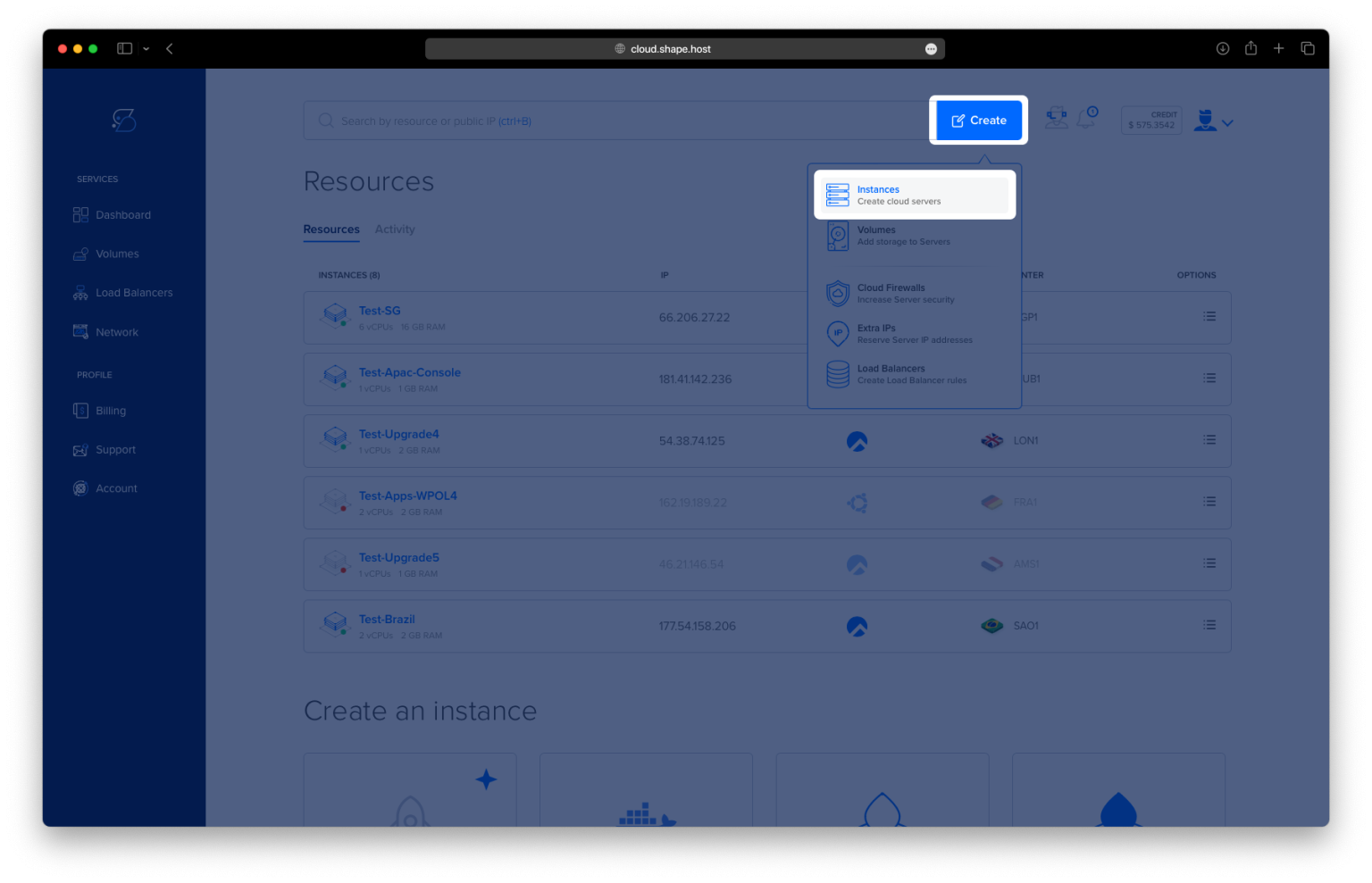
Click “Create” → “Instance.”

Choose the following:
Location: Select a region near your target users.

Operating System: Choose Ubuntu 24.04 (64-bit).
Resources: Select a plan with at least 2 vCPUs, 4 GB RAM, and 40 GB SSD.

Click “Create Instance.”

After creation, copy the public IP address from the “Resources” section.

Step 2: Connect to Your Server via SSH
On Linux/macOS:
ssh root@your_server_ip
On Windows (via PuTTY):
- Open PuTTY and enter your server’s IP under “Host Name”
- Click Open, then log in as
root
Step 3: Install Required Software
Step 3.1 – Update the Package List
apt update

Step 3.2 – Install OpenJDK 17
Spark requires Java. Install OpenJDK 17:
apt install openjdk-17-jdk

Step 3.3 – Verify Java Installation
java -version
You should see output confirming that Java 17 is installed.

Step 3.4 – Install Python 3 and pip
Spark supports Python through PySpark:
apt install python3 python3-pip

Step 4: Download and Install Apache Spark
Step 4.1 – Navigate to the /opt Directory
cd /opt
Step 4.2 – Download Apache Spark 3.5.1 with Hadoop 3
wget https://archive.apache.org/dist/spark/spark-3.5.1/spark-3.5.1-bin-hadoop3-scala2.13.tgz

Step 4.3 – Extract the Archive
tar -xzf spark-3.5.1-bin-hadoop3-scala2.13.tgz
Step 4.4 – Rename the Directory for Simplicity
mv spark-3.5.1-bin-hadoop3-scala2.13 spark

Step 5: Configure Environment Variables
Step 5.1 – Edit the .bashrc File
nano ~/.bashrc
Add the following lines to the end of the file:
export SPARK_HOME=/opt/spark
export PATH=$SPARK_HOME/bin:$PATH

Step 5.2 – Reload the Shell Configuration
source ~/.bashrc
Step 6: Verify the Installation
Step 6.1 – Check the Spark Version
spark-shell --version
You should see the version details of Spark and Scala.

Step 6.2 – Launch Spark Shell
spark-shell

Once launched, the Spark interactive shell will start, and the web UI will be accessible at:
http://localhost:4040

You’ve successfully installed Apache Spark 3.5.1 on Ubuntu 24.04 with OpenJDK 17 and Python 3. This setup is ready for running distributed data processing tasks, machine learning workloads, or exploring PySpark.
Power your data projects with Shape.Host
Get high-performance Cloud VPS infrastructure tailored for scalable analytics.
Deploy your Spark server today at https://shape.host