Focalboard on AlmaLinux 9 (PostgreSQL + Nginx + SSL)
Focalboard is a free, open-source project management and collaboration platform that helps individuals and teams manage tasks, workflows, and projects. Similar to Trello, Asana, or Notion, it offers kanban boards, calendars, lists, and database-style views — but unlike those SaaS tools, Focalboard is self-hosted, giving you complete control over your infrastructure and data.
Running Focalboard on AlmaLinux 9 — a RHEL-compatible enterprise Linux distribution — provides a secure, stable, and long-term supported platform. With SELinux enforcement, systemd 252, OpenSSL 3, PostgreSQL 15, and modern Node.js support, AlmaLinux is an excellent choice for deploying Focalboard behind Nginx with SSL termination in enterprise or small-team environments.
Architecture Overview
| Layer | Component | Role |
|---|---|---|
| OS | AlmaLinux 9 | Enterprise-grade, RHEL-compatible Linux base with SELinux |
| Database | PostgreSQL 15 | Stores tasks, projects, and metadata |
| Application | Focalboard Server | Provides the web interface and backend APIs |
| Runtime | Node.js (LTS) | Executes the Focalboard backend |
| Process Manager | systemd / PM2 | Ensures Focalboard stays online and restarts on failure |
| Reverse Proxy | Nginx | TLS termination, routing, caching, compression |
| TLS | Let’s Encrypt / PKI | Provides secure HTTPS access for teams and users |
Why Use Focalboard?
- Self-hosted project management – replace Trello, Asana, or Notion.
- Data sovereignty – your projects and workflows remain on your servers.
- Open-source & free – no subscription fees or vendor lock-in.
- Feature-rich – kanban boards, task lists, calendars, filters, and more.
- Collaboration-ready – built for freelancers, small teams, and enterprises.
Focalboard vs Other Tools
| Feature/Capability | Focalboard (Self-hosted) | Trello (Cloud) | Asana (Cloud) | Notion (Cloud) |
|---|---|---|---|---|
| Hosting | Self-hosted | SaaS only | SaaS only | SaaS only |
| Data ownership | Full control | Vendor-owned | Vendor-owned | Vendor-owned |
| Cost | Free, open-source | Paid tiers | Paid tiers | Paid tiers |
| Features | Kanban, tasks, calendars | Kanban only | Project mgmt + tasks | Notes + tasks |
Focalboard is best suited for teams and organizations that want project management without SaaS dependencies.
Security & Best Practices
- Run Focalboard behind Nginx with HTTPS enabled.
- Secure PostgreSQL with role-based permissions and frequent backups.
- Deploy under a non-root system user for security.
- Manage the service with systemd to ensure uptime and controlled restarts.
- Apply SELinux policies and firewall rules to restrict access.
- Keep Node.js, PostgreSQL, and AlmaLinux patched and updated.
- Harden Nginx with security headers (HSTS, CSP, Referrer-Policy, etc.).
Typical Use Cases
- Freelancers organizing multiple projects with clients.
- Small businesses/teams replacing Trello or Asana with a free tool.
- Organizations requiring on-premises task management under compliance rules.
- Educational institutions offering collaborative planning tools.
- Enterprises embedding self-hosted project management into their IT workflows.
Deploying Focalboard on AlmaLinux 9 with PostgreSQL, Nginx, and SSL gives you a secure, enterprise-ready project management platform with full control of your data and no vendor lock-in.
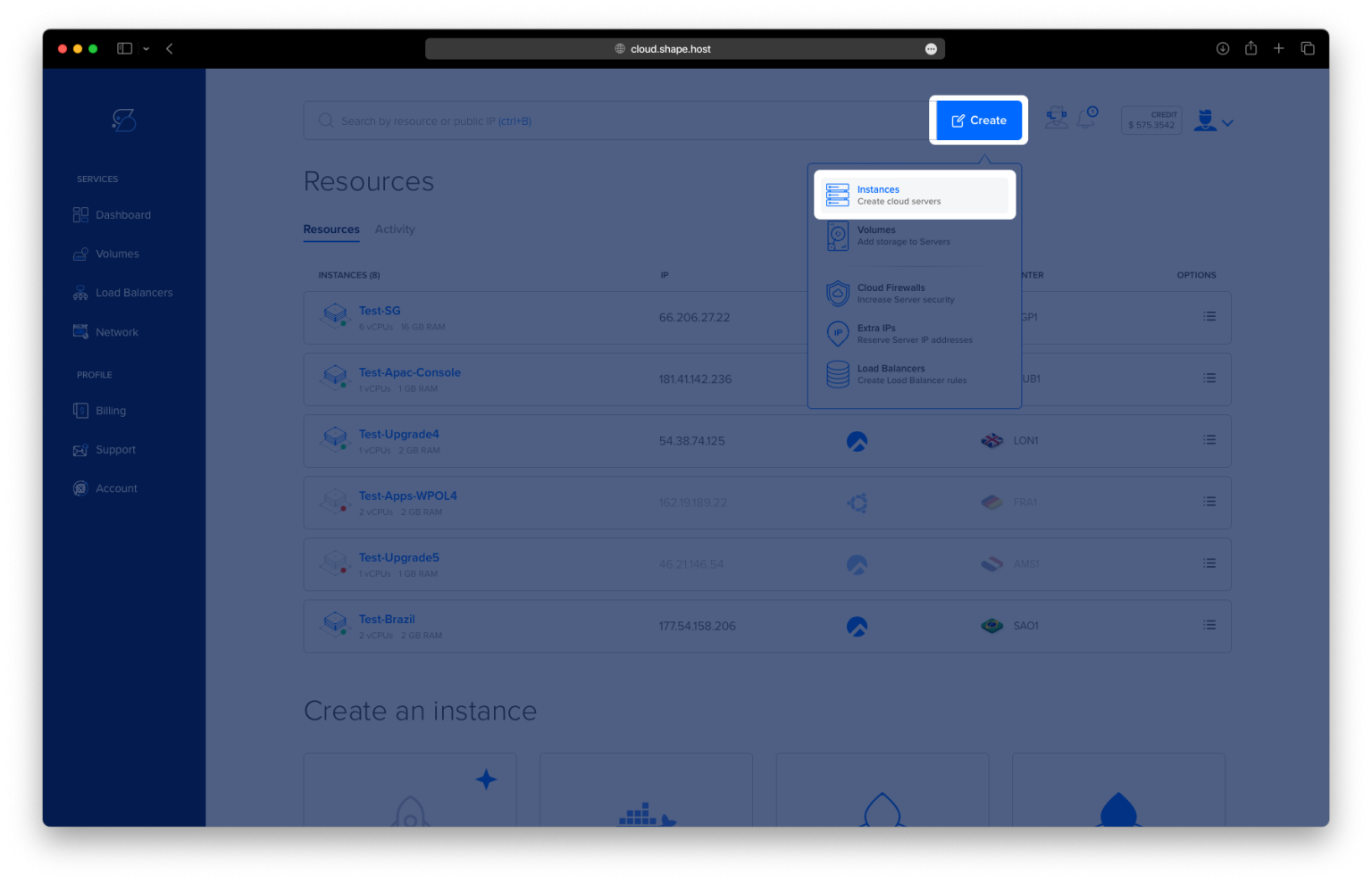
Step 1: Create a Server Instance on Shape.Host
Before installing, you’ll need a fresh AlmaLinux 9 server.
Log into your Shape.Host dashboard.
Click Create → Instance.

Select a data center location near your users.

Choose a plan with at least 2 CPUs, 4 GB RAM, and 20 GB SSD.
Pick AlmaLinux 9 (64-bit) as the OS.

Click Create Instance.

Once deployed, copy the server’s public IP from the Resources tab.

Step 2: Connect to Your Server
- Linux/macOS:
ssh root@your_server_ip - Windows (PuTTY):
- Enter your server IP in PuTTY.
- Select SSH and click Open.
- Log in with your Shape.Host credentials.
Step 3: Update System and Install Required Packages
dnf update
dnf install epel-release
dnf install wget curl unzip nginx certbot python3-certbot-nginx firewalld
- Updates the system.
- Adds EPEL (Extra Packages for Enterprise Linux).
- Installs essential tools (
wget,curl,unzip), Nginx, Certbot for SSL, and firewalld for firewall management.


Enable Nginx:
systemctl enable --now nginx

Step 4: Install PostgreSQL
dnf install postgresql-server postgresql-contrib
postgresql-setup --initdb
systemctl enable --now postgresql
- Installs PostgreSQL server and extra utilities.
- Initializes the database.
- Starts PostgreSQL and enables it on boot.


Step 5: Download and Extract Focalboard
Create a directory and download the package:
mkdir -p /opt/focalboard
cd /opt/focalboard
wget https://sourceforge.net/projects/focalboard.mirror/files/v7.10.6/focalboard-server-linux-amd64.tar.gz/download -O focalboard.tar.gz
tar -xzf focalboard.tar.gz

Step 6: Configure Focalboard
Edit the main configuration file:
nano /opt/focalboard/focalboard/config.json
Example configuration (SQLite by default, PostgreSQL connection string included if you want to switch):
{
    "serverRoot": "http://localhost:8000",
    "port": 8000,
    "dbtype": "sqlite3",
    "dbconfig": "./focalboard.db",
    "postgres_dbconfig": "dbname=focalboard sslmode=disable",
    "useSSL": false,
    "webpath": "./pack",
    "filespath": "./files",
    "telemetry": true,
    "prometheusaddress": ":9092",
    "session_expire_time": 2592000,
    "session_refresh_time": 18000,
    "localOnly": false,
    "enableLocalMode": true,
    "localModeSocketLocation": "/var/tmp/focalboard_local.socket"
}

Step 7: Create a systemd Service
nano /etc/systemd/system/focalboard.service
Paste:
[Unit]
Description=Focalboard Server
After=network.target

[Service]
Type=simple
Restart=always
RestartSec=5s
ExecStart=/opt/focalboard/focalboard/bin/focalboard-server
WorkingDirectory=/opt/focalboard/focalboard

[Install]
WantedBy=multi-user.target

Reload systemd and start service:
systemctl daemon-reload
systemctl enable --now focalboard
systemctl status focalboard

Step 8: Configure Nginx Reverse Proxy
nano /etc/nginx/conf.d/focalboard.conf
Insert:
upstream focalboard {
    server 127.0.0.1:8000;
    keepalive 32;
}

server {
    listen 80;
    server_name yourdomain.com;

    location / {
        proxy_pass http://focalboard;
        proxy_set_header Host $host;
        proxy_set_header X-Real-IP $remote_addr;
        proxy_set_header X-Forwarded-For $proxy_add_x_forwarded_for;
        proxy_set_header X-Forwarded-Proto $scheme;
    }

    location ~ /ws/* {
        proxy_http_version 1.1;
        proxy_set_header Upgrade $http_upgrade;
        proxy_set_header Connection "upgrade";
        proxy_pass http://focalboard;
    }
}

Test and reload Nginx:
nginx -t
systemctl reload nginx

Step 9: Secure with Let’s Encrypt SSL
certbot --nginx -d almalinux-tutorials.shape.host

Once done, visit:
https://almalinux-tutorials.shape.host
You should now see Focalboard running.


You installed Focalboard on AlmaLinux 9 with systemd, Nginx reverse proxy, and Let’s Encrypt SSL.
This setup gives you a production-ready task management solution that’s private, secure, and scalable.
For reliable deployments, consider hosting on Shape.Host Linux SSD VPS — optimized for high-performance applications like Focalboard.