GlitchTip (Sentry Alternative) on AlmaLinux 9 (Docker Compose + Nginx + SSL)
GlitchTip is a modern, open-source error tracking and performance monitoring platform designed as a lightweight, privacy-focused alternative to Sentry. It helps developers detect and analyze application errors, monitor performance, and track releases — all with full control over infrastructure and data. GlitchTip supports Sentry SDKs, making it a seamless replacement for existing Sentry integrations.
Running GlitchTip on AlmaLinux 9, a RHEL-compatible enterprise operating system, ensures stability, reliability, and long-term security for production environments. With SELinux enforcement, systemd 252, OpenSSL 3, and the latest Docker packages, AlmaLinux 9 is an excellent foundation for deploying GlitchTip using Docker Compose, PostgreSQL, Redis, and Nginx with SSL.
Architecture Overview
| Layer | Component | Role |
|---|---|---|
| OS | AlmaLinux 9 | Enterprise-grade, RHEL-compatible operating system |
| Container Runtime | Docker Engine + Compose | Orchestrates GlitchTip services and dependencies |
| Application | GlitchTip (Django) | Web interface and backend for error tracking and analytics |
| Database | PostgreSQL 15 | Stores projects, user data, and event logs |
| Cache/Queue | Redis | Handles background jobs, async events, and caching |
| Reverse Proxy | Nginx | Terminates HTTPS, routes requests, and handles compression |
| TLS | Let’s Encrypt / PKI | Provides SSL encryption for web interface and API |
Why Use GlitchTip?
- Open-source Sentry replacement – no licensing fees or data restrictions.
- Sentry SDK compatible – easily switch without code changes.
- Privacy-focused – all data stays within your infrastructure.
- Performance metrics – monitor response times and bottlenecks.
- Team management – multi-user roles, project grouping, and reporting.
- Email notifications – alert teams of critical exceptions automatically.
- Efficient and scalable – runs smoothly on modest resources.
GlitchTip vs Other Error Tracking Tools
| Feature/Capability | GlitchTip (Self-hosted) | Sentry (Cloud/Self-hosted) | LogRocket | Elastic APM |
|---|---|---|---|---|
| Hosting | Self-hosted / Cloud | Cloud or on-prem | Cloud only | Self-hosted / Cloud |
| Database | PostgreSQL | PostgreSQL | Proprietary | Elasticsearch |
| Source available | 100% open-source | Partially open-source | No | Yes |
| SDK compatibility | Sentry SDKs supported | Native | No | Partial |
| Cost | Free, open-source | Paid tiers | Subscription | License-based |
| Ideal for | DevOps teams / SMBs | Enterprises | Frontend apps | Large setups |
GlitchTip offers Sentry-level monitoring with complete transparency, making it ideal for teams who value open-source freedom, simplicity, and data ownership.
Security & Best Practices
- Deploy behind Nginx or Traefik with HTTPS enabled.
- Use Docker secrets or .env files to store credentials securely.
- Limit PostgreSQL and Redis access to internal Docker networks.
- Enable SELinux enforcement and configure ports via
semanage. - Keep Docker images, AlmaLinux, and GlitchTip updated regularly.
- Restrict access with firewalld, allowing only ports 80 and 443.
- Automate SSL renewals with Certbot or Traefik’s ACME integration.
- Schedule PostgreSQL backups for database recovery and retention.
- Enable fail2ban or similar tools for login brute-force protection.
Typical Use Cases
- Error monitoring for web, mobile, and backend systems.
- Frontend crash tracking using Sentry-compatible SDKs.
- Performance monitoring for API latency and server response time.
- Release tracking with deployment visibility.
- Self-hosted observability for GDPR- or HIPAA-compliant environments.
- Alternative to Sentry Cloud for teams requiring privacy and independence.
Deploying GlitchTip on AlmaLinux 9 with Docker Compose provides a robust, secure, and fully self-hosted monitoring platform that rivals Sentry in functionality — ideal for developers, startups, and enterprises seeking open-source control and reliability.
Step 1: Create a Shape.Host Cloud VPS Instance
Go to Shape.Host and log in.
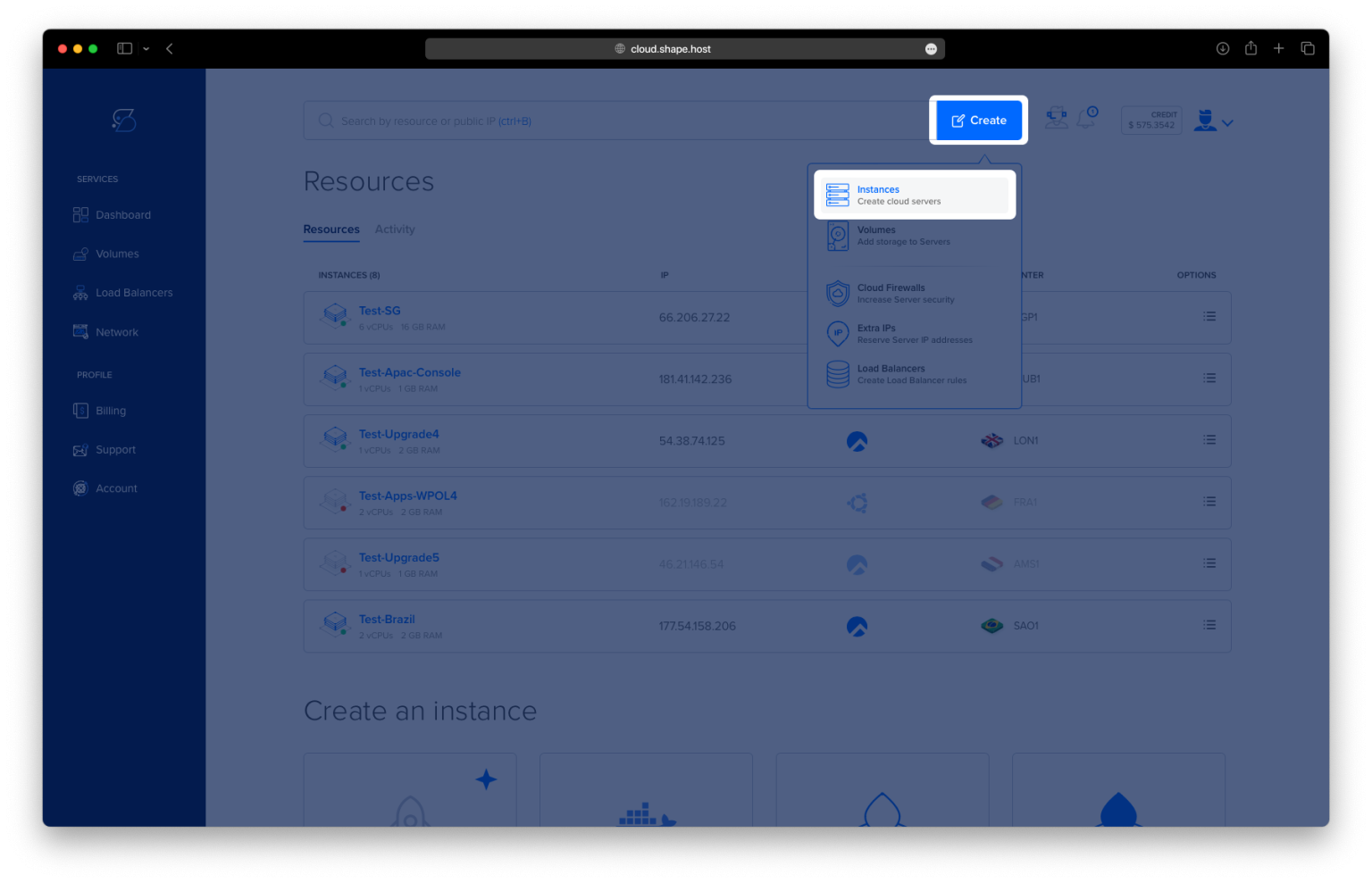
Click Create → Instance.

Choose your preferred location.

Select a plan with at least 2 CPUs, 4 GB RAM, and 20 GB SSD.
Choose AlmaLinux 9 (64-bit) as your operating system.

Click Create Instance.

Copy the server IP address from the Resources section.

Step 2: Connect to Your Server
Connect via SSH:
ssh root@your_server_ip
Step 3: Update the System
It’s important to update all packages to ensure stability and compatibility.
dnf update -y

Step 4: Install Docker and Dependencies
Install required packages for repository management and HTTPS communication:
dnf install curl ca-certificates gnupg2 yum-utils -y

Add Docker’s official repository for CentOS/AlmaLinux:
dnf config-manager --add-repo https://download.docker.com/linux/centos/docker-ce.repo

Install Docker Engine, the CLI tools, and Docker Compose plugin:
dnf install docker-ce docker-ce-cli containerd.io docker-compose-plugin -y

Enable and start the Docker service:
systemctl enable --now docker
Check Docker and Docker Compose versions to confirm installation:
docker --version
docker compose version
Step 5: Prepare the GlitchTip Directory
Create and navigate to the GlitchTip installation directory:
mkdir -p /opt/glitchtip
cd /opt/glitchtip

Step 6: Create the Docker Compose Configuration
Create the Docker Compose configuration file:
nano docker-compose.yml
Paste the following configuration:
services:
  postgres:
    image: postgres:15
    container_name: glitchtip_postgres
    restart: always
    environment:
      POSTGRES_DB: glitchtip
      POSTGRES_USER: glitchtip
      POSTGRES_PASSWORD: strongpassword
    volumes:
      - ./postgres-data:/var/lib/postgresql/data

  redis:
    image: redis:7
    container_name: glitchtip_redis
    restart: always

  glitchtip:
    image: glitchtip/glitchtip:latest
    container_name: glitchtip_app
    depends_on:
      - postgres
      - redis
    environment:
      DATABASE_URL: postgres://glitchtip:strongpassword@postgres:5432/glitchtip
      SECRET_KEY: changethiskeytoarandomstring
      EMAIL_URL: smtp://smtp.example.com:587
      DEFAULT_FROM_EMAIL: noreply@example.com
      CELERY_BROKER_URL: redis://redis:6379/0
      ENABLE_SIGNUPS: "True"
      GLITCHTIP_DOMAIN: https://glitchtip.example.com
    ports:
      - "8000:8080"
    volumes:
      - ./uploads:/app/uploads
    restart: always
⚙️ Important Notes:
- Replace
strongpasswordwith a strong PostgreSQL password.- Replace
changethiskeytoarandomstringwith a secure 32-character random string (openssl rand -hex 32).- Replace
smtp.example.comwith your actual mail server.- Change
glitchtip.example.comto your real domain name.
Save and exit with CTRL + O, ENTER, CTRL + X.

Step 7: Launch GlitchTip Containers
Download the required images and start all containers:
docker compose up -d

Check if everything is running:
docker ps

Step 8: Initialize the Database
Run the database migrations:
docker compose exec glitchtip python3 manage.py migrate

Create a superuser account to log in to GlitchTip:
docker compose exec glitchtip python3 manage.py createsuperuser
Enter your email, username, and password when prompted.

Step 9: Install and Configure Nginx
Install Nginx to serve GlitchTip behind a reverse proxy:
dnf install nginx -y

Enable and start Nginx:
systemctl enable --now nginx
Create a new Nginx configuration file:
nano /etc/nginx/conf.d/glitchtip.conf
Paste this configuration:
server {
    listen 80;
    server_name glitchtip.example.com;

    location / {
        proxy_pass http://127.0.0.1:8000;
        proxy_http_version 1.1;
        proxy_set_header Host $host;
        proxy_set_header X-Real-IP $remote_addr;
        proxy_set_header X-Forwarded-For $proxy_add_x_forwarded_for;
        proxy_set_header X-Forwarded-Proto $scheme;
        proxy_buffering off;
    }
}

Check the syntax and reload Nginx:
nginx -t
systemctl reload nginx

Step 10: Secure GlitchTip with SSL
Install Certbot and its Nginx plugin:
dnf install certbot python3-certbot-nginx -y

Obtain and apply a free SSL certificate from Let’s Encrypt:
certbot --nginx -d almalinux-tutorials.shape.host --email contact@shape.host --agree-tos --non-interactive

Reload Nginx to apply HTTPS:
systemctl reload nginx
Step 11: Restart Containers
Restart the GlitchTip containers to ensure all services load with the latest environment settings:
docker compose restart

Step 12: Access GlitchTip
Open your browser and visit:
https://glitchtip.example.com
Log in with the superuser credentials you created earlier.
You’ll now have access to your self-hosted Sentry-compatible error tracking system.


Step 13: (Optional) Enable Firewall Rules
Allow essential services through the firewall:
firewall-cmd --permanent --add-service=http
firewall-cmd --permanent --add-service=https
firewall-cmd --reload
You installed GlitchTip (Sentry Alternative) on AlmaLinux 9 using Docker Compose, Nginx, and Let’s Encrypt SSL.
You now have a robust, self-hosted monitoring platform with complete data control — ideal for development teams or enterprises that prioritize privacy, security, and flexibility.
Deploy GlitchTip confidently on a Shape.Host Linux SSD VPS, built for performance, reliability, and full root access.