What is Valkey?
Valkey is a high-performance, in-memory key-value data store and caching engine, created as a community-driven fork of Redis following its license change. It maintains compatibility with Redis clients and APIs while remaining fully open-source under the BSD 3-Clause license. Valkey is ideal for use cases like caching, message brokering, session storage, real-time analytics, and leaderboards.
Running Valkey on Ubuntu 24.04 LTS gives you a modern, stable, and secure platform with long-term support, ensuring high availability, low-latency performance, and smooth integration with modern web stacks.
Key Features of Valkey
In-Memory Storage with Optional Persistence
- Fast data access by storing keys entirely in RAM
- Supports RDB snapshots and Append-Only File (AOF) for durability
- Can operate as a pure cache or as a persistent NoSQL store
Rich Data Types
- Strings, Hashes, Lists, Sets, Sorted Sets
- Streams (for messaging and event systems)
- HyperLogLogs, Bitmaps, Geospatial indexes, Pub/Sub channels
Compatible with Redis Clients
- Drop-in replacement for Redis in most use cases
- Works with Redis CLI and tools like
redis-cli,redis-benchmark,redis-py,ioredis, etc.
Performance and Scalability
- Sub-millisecond latency on common operations
- Built-in replication, clustering, and high availability (Sentinel)
- Support for multithreaded I/O and asynchronous commands (ongoing improvements)
Open Governance and Active Development
- Backed by Linux Foundation
- Transparent community contributions via GitHub
- Focus on security, performance, and backwards compatibility
Why Use Valkey on Ubuntu 24.04?
Ubuntu 24.04 provides:
- Updated system libraries and glibc for optimal performance
- Long-term security updates through 2029
- Easy integration with systemd, AppArmor, UFW, and modern file systems
- Ideal for deployment with Docker, Kubernetes, and cloud-native stacks
System Requirements
| Component | Minimum Requirement |
|---|---|
| OS | Ubuntu 24.04 LTS (64-bit) |
| CPU | 1+ core (multi-core for higher throughput) |
| RAM | 512 MB minimum (based on dataset size) |
| Disk Space | Optional (only for persistence/logs) |
| Network | Ports 6379 (default), 26379 (Sentinel) |
| Dependencies | libc6, systemd, libssl, libgcc |
Typical Use Cases
- Web caching for APIs, dynamic websites, and search results
- Session management for PHP, Node.js, Python, etc.
- Message queues via Pub/Sub or Streams
- Real-time analytics and counters
- Leaderboard and ranking systems (via Sorted Sets)
- Rate limiting and access control
Valkey vs Redis vs Other Caches
| Feature | Valkey | Redis | Memcached | Etcd |
|---|---|---|---|---|
| License | BSD 3-Clause | Redis Source Available (RSA) | BSD | Apache 2.0 |
| Data Types | Rich (same as Redis) | Rich | Strings only | Key-value with leases |
| Pub/Sub Support | Yes | Yes | No | No |
| Persistence | RDB, AOF | RDB, AOF | No | Yes (disk-backed) |
| High Availability | Sentinel, Cluster | Sentinel, Cluster | External only | Built-in |
| Ideal Use | Redis-compatible FOSS caching | Enterprise caching | Lightweight cache | Configuration stores |
Deployment Options on Ubuntu 24.04
- Systemd Service: Run Valkey as a systemd-managed daemon
- Docker Container: Lightweight containerized deployments
- Kubernetes Pod: Clustered deployment with Helm charts or Operators
- Standalone or Clustered: Scale from single-node to multi-shard setups
- Sentinel Mode: Add high availability and failover capability
Security Best Practices
- Bind Valkey to
localhostor private IP (bind 127.0.0.1) - Use strong passwords via
requirepassor ACLs - Run Valkey as a non-root user
- Enable TLS encryption for secure traffic (optional build with TLS)
- Restrict access with UFW, iptables, or private networks
- Regularly monitor logs and version updates
Monitoring and Management Tools
- valkey-cli: Compatible with Redis CLI commands
- valkey-benchmark: Load testing tool
- Prometheus Exporter: For time-series metrics
- Grafana Dashboards: Visualization of memory, ops/sec, and keyspace
- Valkey Insight (community) or custom dashboards via StatsD
Valkey on Ubuntu 24.04 is a fast, reliable, and fully open-source alternative to Redis, with strong community backing and compatibility. Whether you need a simple caching layer or a robust in-memory data platform for messaging and analytics, Valkey provides the same familiar interface as Redis without license restrictions.
Ubuntu 24.04 enhances this setup with a secure, long-term supported foundation—ideal for production servers, containerized apps, cloud environments, or edge deployments. Valkey is a future-proof choice for developers and organizations seeking open innovation in high-performance data systems.
Step 1: Set Up a VPS on Shape.Host
Go to https://shape.host and sign in.
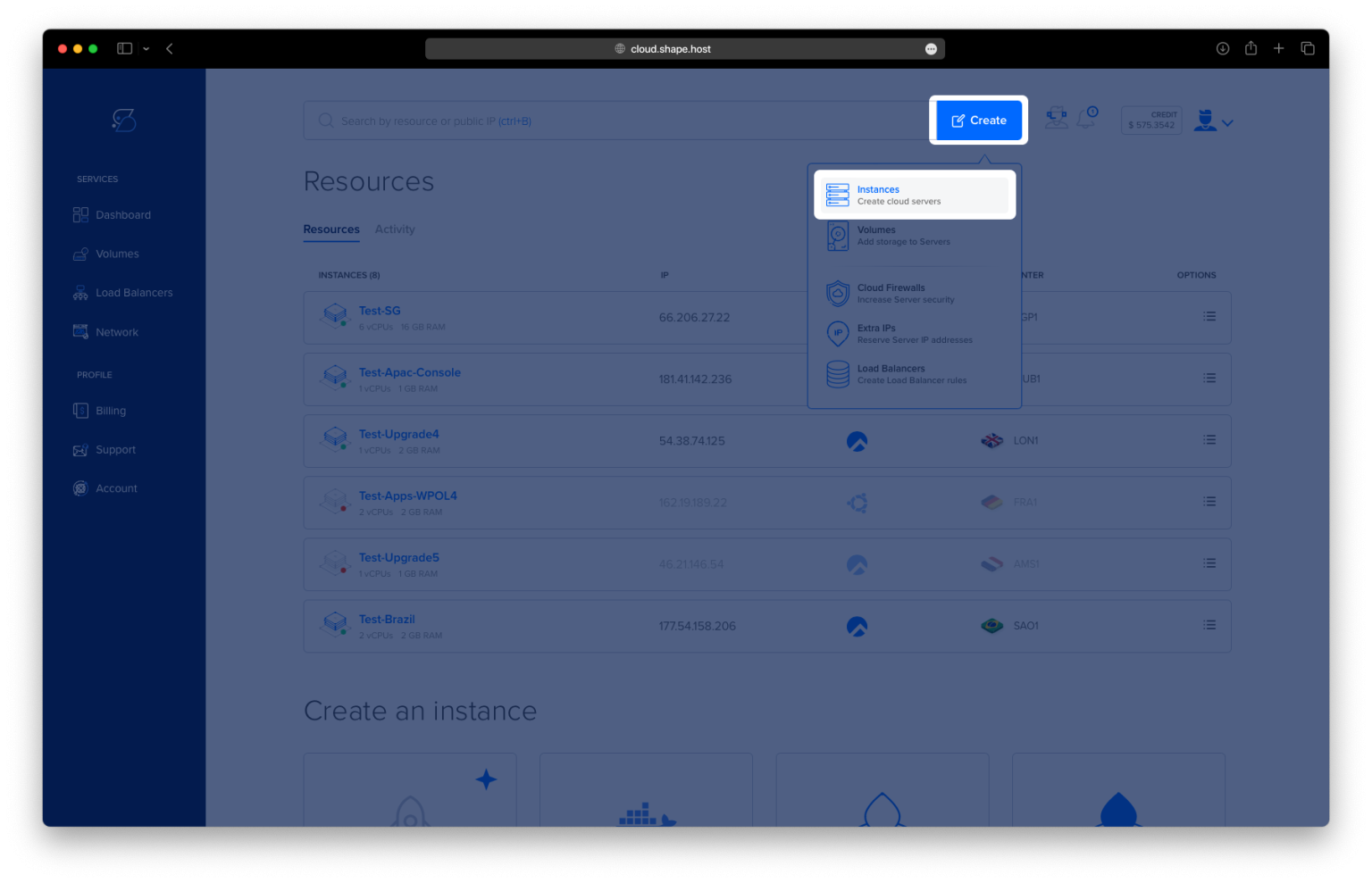
Click Create, then select Instance.

Choose a server location near your users.

Select Ubuntu 24.04 (64-bit) as your OS.
Pick a plan with at least 2 CPUs, 4 GB RAM, and 20 GB SSD.

Click Create Instance.

Find your instance’s IP address in the Resources tab.

Step 2: Connect to Your Server
Linux/macOS:
ssh root@your_server_ip
Windows:
Use PuTTY, enter your server IP, and log in as root.
Step 3: Update System Packages
apt update
Refreshes your system’s package list to the latest available versions.

Step 4: Install Valkey
apt install valkey
This installs the Valkey in-memory key-value database server.

Step 5: Configure Valkey
nano /etc/valkey/valkey.conf
Inside this file, make a few changes based on your environment:
bind 127.0.0.1 -::1
You can replace this with:
bind 0.0.0.0
…to allow connections from other machines.
port 6379
This is the default port — leave it unless you need something else.
daemonize yes
This lets Valkey run in the background.
databases 16
This sets the number of available logical databases (default is 16).
Step 6: Restart the Valkey Service
systemctl restart valkey
Applies your configuration changes and starts Valkey.

Step 7: Use Valkey CLI
You can now interact with Valkey:
valkey-cli

Or connect to a remote instance:
valkey-cli -h node01.example.com
Once inside the CLI, try some useful commands:
client list
info
monitor
quit


You’ve now installed and configured Valkey on Ubuntu 24.04, and you’re ready to use it via the CLI or from external apps.
Shape.Host provides everything you need to run Valkey:
- Fast, scalable Cloud Vps servers
- Root access and easy OS selection
- Great uptime for in-memory caching and database workloads
Launch yours now at https://shape.host