Excalidraw on Debian 12
(Docker + Nginx + SSL)
Excalidraw is an open-source virtual whiteboard and diagramming application built for fast, intuitive visual collaboration. It allows users to create hand-drawn–style diagrams, flowcharts, wireframes, system designs, and sketches directly in the browser, with a strong emphasis on simplicity, speed, and privacy.
Unlike many commercial whiteboard platforms, Excalidraw can be fully self-hosted, giving you complete control over access, data, and availability. This makes it an excellent choice for development teams, educators, designers, and organizations that want collaborative whiteboarding without relying on external SaaS services.
Running Excalidraw on Debian 12 (Bookworm) provides a stable, security-focused, and long-term supported operating system. Debian 12 includes systemd 252, OpenSSL 3, and mature Docker and Nginx packages, making it a reliable foundation for hosting Excalidraw with Docker, Nginx, and HTTPS (SSL) in a production-ready setup.
Architecture Overview
| Layer | Component | Role |
|---|---|---|
| OS | Debian 12 (Bookworm) | Stable, production-grade Linux base |
| Container Runtime | Docker / Docker Compose | Runs the Excalidraw application |
| Application | Excalidraw (React) | Whiteboard UI and collaboration logic |
| Reverse Proxy | Nginx | HTTPS termination, routing, compression |
| TLS | Let’s Encrypt / PKI | Encrypted web access |
| Clients | Web browsers | Create and collaborate on diagrams |
Excalidraw is stateless by design, which makes it very easy to deploy, upgrade, and scale.
Why Use Excalidraw?
- Extremely simple and intuitive UI – no onboarding required
- Hand-drawn style diagrams – perfect for brainstorming and planning
- Fully self-hosted – no third-party dependencies
- Privacy-friendly – drawings remain on your server
- Real-time collaboration – share links and collaborate instantly
- Export formats – PNG, SVG, and Excalidraw JSON
- Open-source & actively maintained
- Very lightweight – minimal CPU and memory usage
Excalidraw is designed to help teams think visually without friction.
Excalidraw vs Other Whiteboard Tools
| Feature / Capability | Excalidraw | Miro | FigJam | Draw.io |
|---|---|---|---|---|
| Hosting | Self-hosted | Cloud only | Cloud only | Cloud / Self |
| Open-source | ✅ Yes | ❌ No | ❌ No | ❌ Partial |
| Real-time collaboration | ✅ Yes | ✅ Yes | ✅ Yes | ❌ Limited |
| Privacy control | Full | Vendor-controlled | Vendor-controlled | Partial |
| Ease of use | Very high | Medium | Medium | Medium |
| Cost | Free | Paid | Paid | Free / Paid |
Excalidraw is ideal when speed, simplicity, and privacy are more important than enterprise-heavy feature sets.
Security & Best Practices on Debian 12
- Run Excalidraw behind Nginx with HTTPS enabled.
- Bind the Excalidraw container to 127.0.0.1 and expose it only via Nginx.
- Use Let’s Encrypt SSL certificates with automatic renewal.
- Use UFW or nftables and allow only ports 80 and 443.
- Regularly update:
- Debian system packages
- Docker images
- Excalidraw container
- Add basic rate limiting in Nginx if publicly accessible.
- Protect access with authentication if used internally (optional).
- Monitor container health and logs.
Typical Use Cases
- System architecture diagrams for DevOps and engineering teams
- Flowcharts and technical documentation
- Brainstorming and planning sessions
- UI wireframes and early design sketches
- Education and remote teaching
- Internal collaboration tools
Deploying Excalidraw on Debian 12 with Docker, Nginx, and SSL gives you a fast, private, and reliable self-hosted whiteboard solution — perfect for visual thinking, technical planning, and collaborative work without SaaS lock-in.
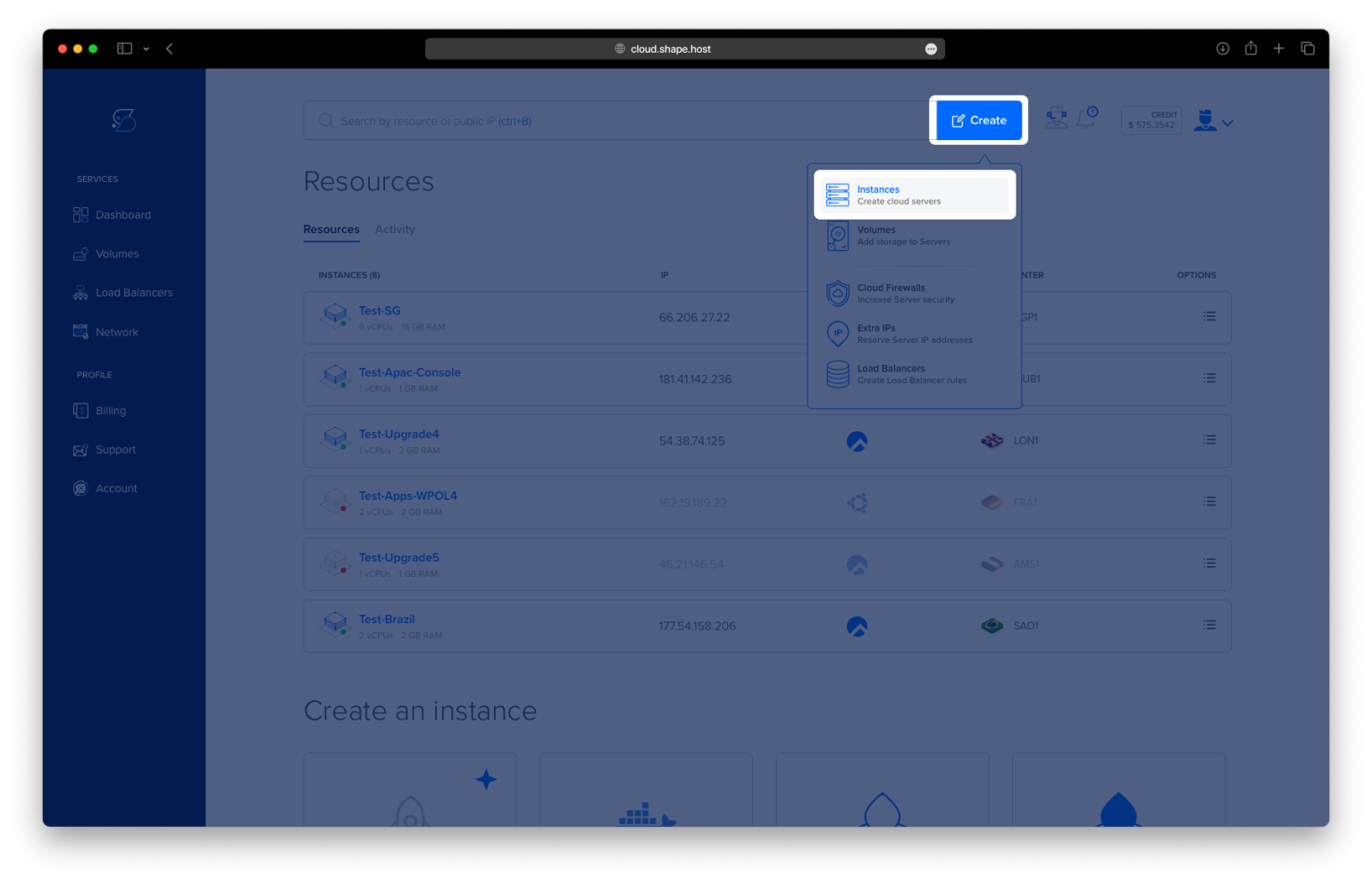
Step 1: Create a Server Instance on Shape.Host
To self-host Excalidraw, you need a VPS with root access and Docker support.
Log in to https://shape.host
Click Create → Instance

Choose a data center location close to your users

Select a plan with at least:
1–2 CPU cores
2 GB RAM
20 GB SSD storage
Choose Debian 12 (Bookworm) as the operating system

Create the instance and wait for provisioning

Copy the public IP address of the server

Step 2: Connect to the Debian 12 Server
From Linux, macOS, or Windows:
ssh root@YOUR_SERVER_IP
This opens a secure shell session and gives you full administrative (root) access.
Step 3: Update the Operating System
apt update
- Updates the local package index
- Ensures the system knows about the latest available packages
apt upgrade -y
- Installs all pending updates
- Reduces the risk of security issues or dependency conflicts later

Step 4: Install Docker Engine
curl -fsSL https://get.docker.com | sh
- Downloads and runs Docker’s official installation script
- Installs Docker Engine and required dependencies automatically

systemctl enable docker
- Configures Docker to start automatically on system boot
systemctl start docker
- Starts the Docker service immediately
docker --version
- Confirms that Docker is installed and working correctly

Step 5: Install Docker Compose Plugin
apt install docker-compose-plugin
- Installs Docker Compose v2 as a plugin
- Enables managing containers using
docker compose
docker compose version
- Verifies that Docker Compose is available
Step 6: Create the Excalidraw Project Directory
mkdir -p /opt/excalidraw
- Creates a dedicated directory for the Excalidraw service
- Keeps application files organized under
/opt
cd /opt/excalidraw
- Switches to the Excalidraw working directory

Step 7: Create Docker Compose Configuration
nano docker-compose.yml
Paste the following content:
services:
  excalidraw:
    image: excalidraw/excalidraw:latest
    container_name: excalidraw
    restart: unless-stopped
    ports:
      - "127.0.0.1:5000:80"
What this configuration does
- Uses the official Excalidraw Docker image
- Runs Excalidraw inside a single container
- Exposes the application only on localhost (127.0.0.1) for security
- Automatically restarts the container if it crashes or the server reboots

Step 8: Start Excalidraw
docker compose up -d
- Pulls the Excalidraw image (if not already present)
- Starts the container in detached (background) mode

docker ps
- Lists running containers
- Confirms that the Excalidraw container is active
curl -I http://127.0.0.1:5000
- Sends a test HTTP request to Excalidraw
- A
200 OKor302response confirms it is running locally

Step 9: Install and Enable Nginx
apt install nginx
- Installs the Nginx web server

systemctl enable nginx
- Configures Nginx to start automatically on boot
systemctl start nginx
- Starts the Nginx service
Nginx will act as a reverse proxy, forwarding public traffic to Excalidraw running inside Docker.

Step 10: Configure Nginx Reverse Proxy
nano /etc/nginx/sites-available/excalidraw
Paste:
server {
    listen 80;
    server_name draw.example.com;

    location / {
        proxy_pass http://127.0.0.1:5000;
        proxy_http_version 1.1;
        proxy_set_header Upgrade $http_upgrade;
        proxy_set_header Connection "upgrade";
        proxy_set_header Host $host;
        proxy_set_header X-Real-IP $remote_addr;
        proxy_set_header X-Forwarded-For $proxy_add_x_forwarded_for;
        proxy_set_header X-Forwarded-Proto $scheme;
    }
}
Why these settings matter
- Listens on port 80 for incoming HTTP traffic
- Proxies requests to Excalidraw running on localhost
- Enables WebSocket support, required by Excalidraw
- Preserves real client IP and protocol headers

Step 11: Enable the Nginx Site
ln -s /etc/nginx/sites-available/excalidraw /etc/nginx/sites-enabled/
- Activates the Excalidraw site configuration
nginx -t
- Tests Nginx configuration for syntax errors
systemctl reload nginx
- Reloads Nginx and applies the new configuration

Step 12: Enable SSL with Let’s Encrypt
apt install certbot python3-certbot-nginx

- Installs Certbot and the Nginx SSL integration plugin
certbot --nginx -d debian-tutorials.shape.host
Replace with your real domain:
yourdomain.com
Certbot will:
- Issue a free SSL certificate
- Automatically update the Nginx configuration
- Enable HTTPS and auto-renewal

Step 13: Access Excalidraw
Open your browser:
https://draw.example.com
You now have:
- A self-hosted Excalidraw instance
- Running in Docker
- Protected by HTTPS
- Accessible via your own domain

You installed Excalidraw on Debian 12 using Docker, exposed it through Nginx, and secured it with Let’s Encrypt SSL. This setup is lightweight, secure, and ideal for personal use, teams, or internal documentation and collaboration.
For hosting self-hosted tools like Excalidraw with full root access, reliability, and scalability, Shape.Host Linux SSD VPS provides a solid foundation for modern server deployments.