Actual Budget on Ubuntu 24.04 (Docker + Nginx + SSL)
Actual Budget is an open-source, self-hosted personal finance and budgeting application inspired by the envelope-based budgeting philosophy popularized by tools like YNAB. It allows you to track income, expenses, accounts, and categories with full control over your financial data. Actual Budget is designed for users who want powerful budgeting features without subscriptions, ads, or cloud lock-in.
Running Actual Budget on Ubuntu 24.04 LTS (Noble Numbat) provides a modern, secure, and long-term supported platform. Ubuntu 24.04 includes systemd 255, OpenSSL 3, and up-to-date Docker and Nginx packages, making it ideal for deploying Actual Budget in a production-ready, self-hosted environment secured with HTTPS.
Architecture Overview
| Layer | Component | Role |
|---|---|---|
| OS | Ubuntu 24.04 LTS | Stable, long-term supported Linux base |
| Container Runtime | Docker / Docker Compose | Runs Actual Budget server |
| Application | Actual Budget (Node.js) | Core budgeting engine and web interface |
| Data Storage | Local storage / SQLite | Stores budgets, transactions, and user data |
| Reverse Proxy | Nginx | HTTPS termination, routing, compression |
| TLS | Let’s Encrypt / PKI | Secure web access to the UI |
Actual Budget runs as a lightweight Node.js service, making it efficient and suitable even for small VPS instances.
Why Use Actual Budget?
- Envelope-based budgeting – assign every euro or dollar a job
- Self-hosted & open-source – complete control over your financial data
- No subscriptions – free to use, no monthly fees
- Privacy-first – no tracking, no third-party analytics
- Multi-account support – track bank accounts, cash, and credit cards
- Powerful reports – spending trends, category analysis, cash flow
- Web-based UI – accessible from desktop, tablet, or mobile browser
Actual Budget vs Other Budgeting Tools
| Feature / Capability | Actual Budget | YNAB | Mint | Firefly III |
|---|---|---|---|---|
| Hosting | Self-hosted | Cloud only | Cloud only | Self-hosted |
| Cost | Free, open-source | Subscription | Free (ads/data) | Free |
| Privacy | Full control | Cloud-based | Data-driven ads | Full control |
| Envelope budgeting | ✅ Yes | ✅ Yes | ❌ No | ❌ Partial |
| Complexity | Simple & focused | Moderate | Simple | Advanced |
| Best for | Personal budgeting | Power users | Casual users | Accounting-heavy users |
Actual Budget is ideal for users who want YNAB-style budgeting without recurring costs or cloud dependency.
Security & Best Practices
- Run Actual Budget behind Nginx with HTTPS enabled.
- Bind the application container to localhost and expose only Nginx.
- Store secrets and configuration using environment variables.
- Enable UFW and allow only ports 80 and 443.
- Automate SSL certificate renewals using Certbot.
- Back up Actual Budget data directories regularly.
- Keep Ubuntu, Docker, and Actual Budget images updated.
- Use strong passwords and restrict access to trusted users.
Typical Use Cases
- Personal budgeting – track monthly income and expenses
- Family finance management – shared household budgets
- Privacy-focused users – avoid SaaS budgeting platforms
- Long-term financial planning – savings goals and spending control
- Minimalist finance tracking – simple, distraction-free budgeting
Deploying Actual Budget on Ubuntu 24.04 with Docker, Nginx, and SSL gives you a secure, private, and subscription-free budgeting platform — combining modern usability with full data ownership and long-term reliability.
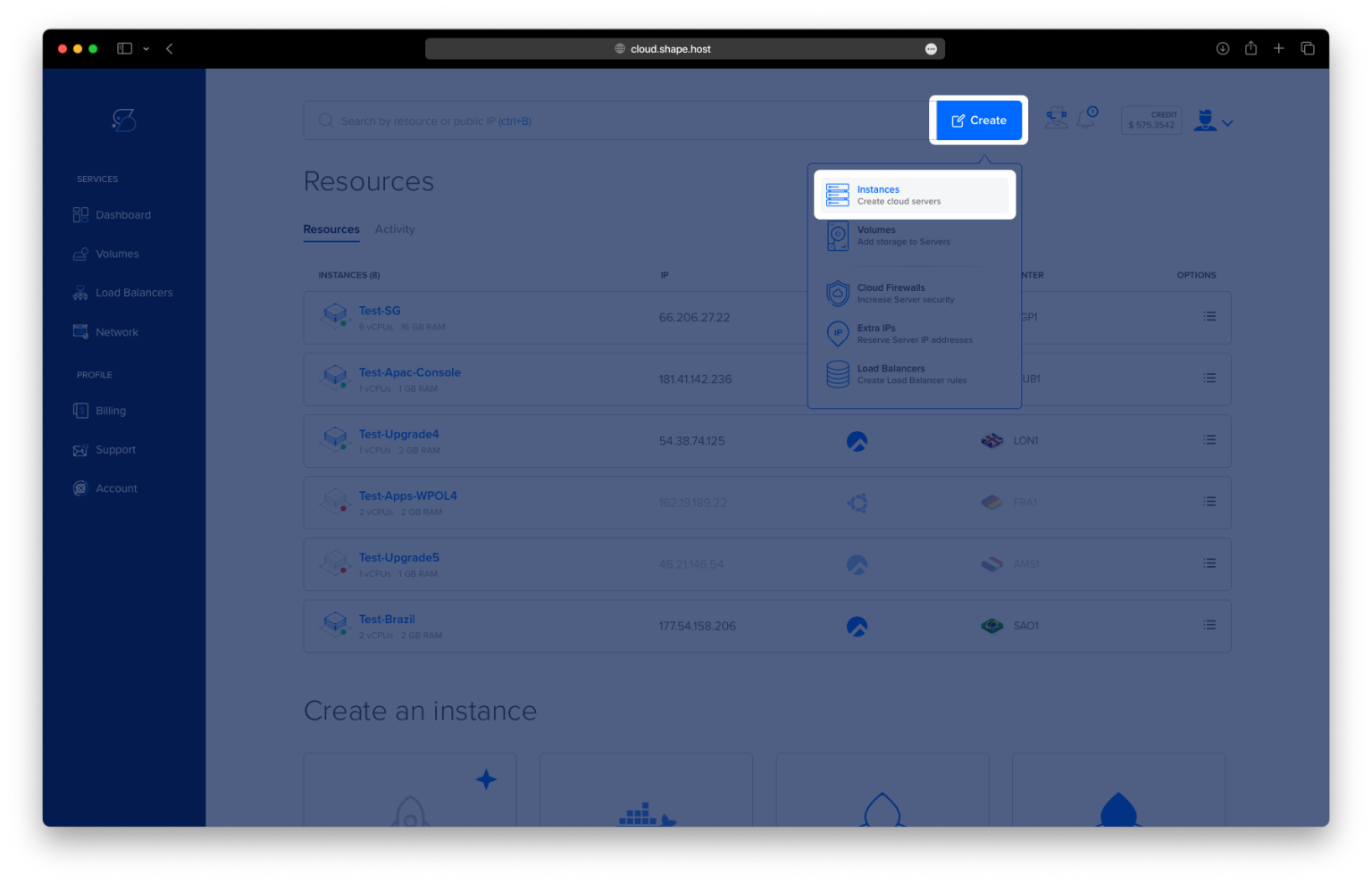
Create a Cloud Server Instance on Shape.Host
Before installing Actual Budget, you need a clean Ubuntu 24.04 VPS.
Go to https://shape.host and log in.
Click Create.
Select Instance.

Choose a data center close to your location or users.

Select Ubuntu 24.04 (64-bit) as the operating system.
Choose a plan (recommended minimum):
2 vCPUs
4 GB RAM
20 GB NVMe SSD

Click Create Instance.
Wait about 30 seconds for provisioning.

Copy the public IP address of your server.
Your Ubuntu server is now ready.

Step 1: Connect to the Server via SSH
Linux / macOS
ssh root@YOUR_SERVER_IP
Windows (PowerShell or Windows Terminal)
ssh root@YOUR_SERVER_IP
Accept the fingerprint when prompted. You are now logged in as root.
Step 2: Update the System
apt update
apt upgrade
These commands refresh the package index and upgrade installed packages to the latest versions.

Step 3: Install Required Dependencies
apt install ca-certificates curl gnupg lsb-release
These packages are required to securely add and verify the Docker repository.

Step 4: Create Docker Keyrings Directory
mkdir -p /etc/apt/keyrings
This directory stores trusted GPG keys.
Step 5: Add Docker GPG Key
curl -fsSL https://download.docker.com/linux/ubuntu/gpg | gpg --dearmor -o /etc/apt/keyrings/docker.gpg
Imports Docker’s official signing key.
Step 6: Add Docker Repository
echo "deb [arch=$(dpkg --print-architecture) signed-by=/etc/apt/keyrings/docker.gpg] \
https://download.docker.com/linux/ubuntu \
$(lsb_release -cs) stable" > /etc/apt/sources.list.d/docker.list
Allows Docker to be installed from the official Docker repository.
Step 7: Update Package List Again
apt update
Loads the newly added Docker repository.

Step 8: Install Docker Engine and Docker Compose
apt install docker-ce docker-ce-cli containerd.io docker-buildx-plugin docker-compose-plugin
Installs Docker Engine and Docker Compose v2.

Step 9: Verify Docker Installation
docker version
docker compose version
Confirms Docker and Docker Compose are installed correctly.
Step 10: Create Actual Budget Directory
mkdir -p /opt/actual
This directory will store the Docker configuration and application data.
Step 11: Enter the Directory
cd /opt/actual

Step 12: Create Docker Compose Configuration
nano docker-compose.yml
Paste the exact configuration from your history:
services:
  actual:
    image: ghcr.io/actualbudget/actual-server:latest
    container_name: actual-budget
    restart: unless-stopped
    ports:
      - "127.0.0.1:5006:5006"
    volumes:
      - ./data:/data
    environment:
      - ACTUAL_SERVER_URL=https://budget.example.com
      - TZ=Europe/Bucharest
Explanation:
- Actual Budget runs inside a Docker container
- Port 5006 is bound only to localhost for security
- Budget data is stored persistently in
./data ACTUAL_SERVER_URLmust match the final domain
Save and exit the editor.

Step 13: Start Actual Budget
docker compose up -d
Starts the Actual Budget server in the background.

Step 14: Verify the Container Is Running
docker ps
You should see the actual-budget container listed as running.

Step 15: Test Actual Budget Locally
curl http://127.0.0.1:5006
Confirms the application responds locally before exposing it via Nginx.
Step 16: Install Nginx
apt install nginx

Step 17: Enable and Start Nginx
systemctl enable nginx
systemctl start nginx

Step 18: Create Nginx Reverse Proxy Configuration
nano /etc/nginx/sites-available/actual
Paste:
server {
    listen 80;
    server_name budget.example.com;

    location / {
        proxy_pass http://127.0.0.1:5006;
        proxy_set_header Host $host;
        proxy_set_header X-Real-IP $remote_addr;
        proxy_set_header X-Forwarded-For $proxy_add_x_forwarded_for;
        proxy_set_header X-Forwarded-Proto $scheme;
    }
}

Step 19: Enable the Nginx Site
ln -s /etc/nginx/sites-available/actual /etc/nginx/sites-enabled/actual
rm /etc/nginx/sites-enabled/default
Step 20: Test and Reload Nginx
nginx -t
systemctl reload nginx

Step 21: Install Certbot and Enable SSL
apt install certbot python3-certbot-nginx
certbot --nginx -d ubuntu-tutorials.shape.host
Certbot automatically issues and configures a free SSL certificate.


Access Actual Budget Securely
https://your-domain.com
Actual Budget is now fully installed and secured on Ubuntu 24.04.


Applications like Actual Budget, ChangeDetection.io, Miniflux, Ghostfolio, NocoDB, and HedgeDoc require fast and reliable infrastructure.
Shape.Host provides:
- High-performance NVMe Cloud VPS
- Instant provisioning
- Clean OS templates
- Excellent uptime
- Easy scalability
Visit https://shape.host to deploy your next self-hosted application with confidence.