Neo4j on Debian 12 “Bookworm” – Enterprise Graph Databases on a Stable, Secure Platform
Neo4j is a high-performance graph database system used to model and query complex, highly connected datasets. Built around the property graph model, it allows for efficient traversals, expressive queries with Cypher, and deep integration with modern data platforms.
Running Neo4j on Debian 12 (Bookworm) offers a production-grade, long-term supported Linux environment with systemd-native service handling, high package stability, and security best practices.
Neo4j Architecture and Model
Neo4j structures data as:
- Nodes (entities)
- Relationships (typed and directed connections)
- Properties (key-value pairs on nodes and relationships)
This model is optimal for:
- Social networks
- Knowledge graphs
- Access control models
- IT network mapping
- Fraud detection
- Recommendation engines
Compatibility with Debian 12
| Component | Support Status in Debian 12 |
|---|---|
| Java Runtime | OpenJDK 17 (required for Neo4j 5.x) |
| Systemd | Fully supported (v252) |
| Filesystem | Ext4, XFS, Btrfs (recommended: Ext4 for simplicity) |
| Package Manager | APT-compatible Neo4j repositories available |
| Kernel Version | Linux 6.1+ – optimal for I/O performance |
| SELinux/AppArmor | AppArmor by default – needs rule tuning |
Neo4j 5.x runs natively on Debian 12 with full support for Java 17, system service management, and secure network configurations.
Interfaces and Access Layers
Neo4j supports multiple access methods:
| Interface | Description |
|---|---|
| Bolt | High-performance binary protocol |
| HTTP/HTTPS REST | REST API for integration |
| Neo4j Browser | Web GUI for development/debugging (port 7474) |
| Neo4j Cypher Shell | CLI for Cypher queries and administration |
| Official Drivers | Java, Python, JavaScript, Go, .NET |
These can be exposed directly or secured behind a reverse proxy such as Nginx on Debian 12.
Security Considerations
Debian 12 provides an ideal base for secure Neo4j deployments:
- UFW or nftables can be used to restrict access to TCP ports (7687, 7474)
- SSL/TLS encryption for Bolt and HTTP(S) endpoints
- Authentication enabled by default (local users or LDAP integration for Enterprise)
- Fine-grained RBAC (Enterprise only)
- AppArmor profiles can restrict process-level access
Administrators should regularly audit neo4j.conf and secure backups and query logs accordingly.
Resource Planning & Tuning
Neo4j benefits heavily from RAM and fast storage due to its in-memory page cache model.
| Graph Size | CPU | RAM | Storage (SSD) |
|---|---|---|---|
| Small (<1M nodes) | 2 cores | 4–8 GB | 20–40 GB |
| Medium (10M+ nodes) | 4–8 cores | 16–32 GB | 100+ GB |
| Large (>100M nodes) | 16+ cores | 64–128 GB | 1TB+ (NVMe RAID) |
Page cache and heap memory must be configured in neo4j.conf for optimal performance:
dbms.memory.heap.initial_size=4g
dbms.memory.heap.max_size=8g
dbms.memory.pagecache.size=16g
Observability and Monitoring
Neo4j provides metrics over Prometheus endpoints, accessible via port 2004 or through integration with:
- Grafana dashboards
- Elastic Stack
- Systemd journalctl logs for service-level diagnostics
- Query logging and slow query profiling
Debian 12’s system logging and process isolation tools (e.g., cgroups, journal filtering) further enhance monitoring capabilities.
Popular Use Cases
| Use Case | Why Neo4j? |
|---|---|
| Fraud detection | Fast pattern matching and path queries |
| Master data management | Entity linkage and identity resolution |
| Recommendation systems | Graph-based personalization |
| Cybersecurity & IAM | Attack surface mapping, RBAC modeling |
| Academic graph research | RDF/OWL-to-graph modeling, semantic data |
Neo4j’s Cypher query language allows expressive and efficient traversal of such domain models.
Comparison with Other Graph Databases
| Feature | Neo4j | ArangoDB | JanusGraph | TigerGraph |
|---|---|---|---|---|
| Maturity | High | Medium | Medium | Medium |
| Cypher support | Native | Partial (via plugin) | No | GSQL (proprietary) |
| Graph type | Property Graph | Multi-model | Property Graph | Property Graph |
| Cluster Support | Enterprise only | Built-in | External (Cassandra/HBase) | Built-in |
| Query Performance | Very high | Medium | Medium | High |
For teams requiring strong visual tooling, Cypher language familiarity, and developer productivity, Neo4j remains a top choice — especially on a stable OS like Debian.
Deploying Neo4j on Debian 12 provides:
- Excellent compatibility with Java 17 and Neo4j 5.x+
- A secure, LTS-supported environment with predictable behavior
- Flexible system management via systemd and AppArmor
- Low-overhead OS ideal for memory- and I/O-heavy graph workloads
- Support for single-node, HA, or clustered (Enterprise) deployments
Whether you’re building real-time analytics, digital twins, or relationship-driven applications, Debian 12 offers a stable and secure foundation for running Neo4j in production.
Step 1: Deploy a Debian 12 Server on Shape.Host
Before installing Neo4j, you need a fresh Debian 12 server. Use Shape.Host to create a reliable VPS:
Log in to your Shape.Host account.
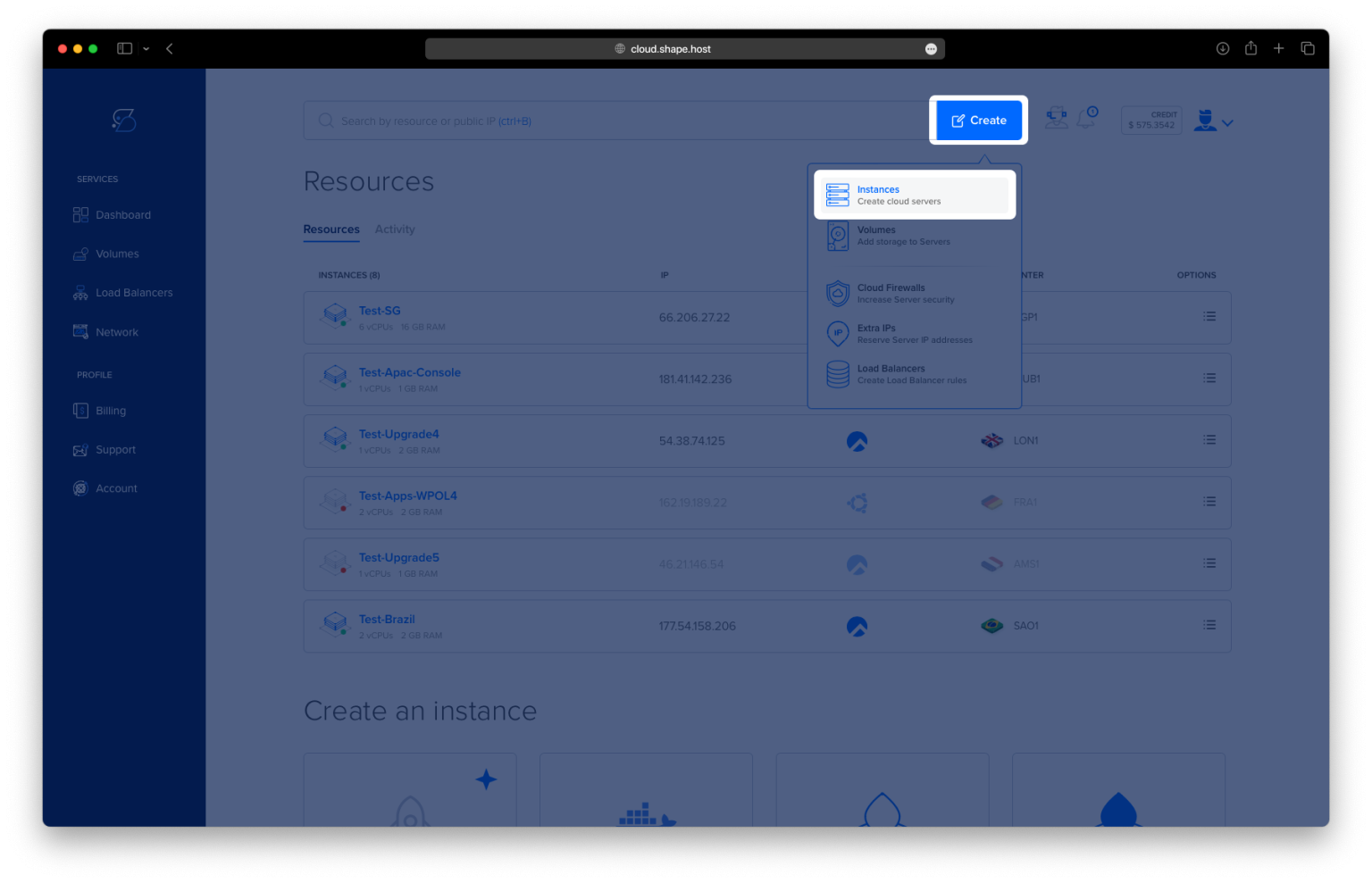
Click “Create” → “Instance”.

Choose a data center near your users.

Select Debian 12 (64-bit) as the OS.
Choose a plan with at least 2 CPUs, 4 GB RAM, and 20 GB SSD.

Click “Create Instance”.

Copy your instance’s IP address and login credentials once it’s ready.

Step 2: Connect to Your Debian Server
On Linux/macOS:
ssh root@your-server-ip
On Windows:
Use PuTTY, and connect to root@your-server-ip.
Replace your-server-ip with the actual IP of your VPS.
Step 3: Install Java and Neo4j
3.1 Update Package Lists
apt update

3.2 Install OpenJDK 17 (Required by Neo4j 5)
apt install openjdk-17-jdk

3.3 Install GnuPG (for GPG Key Management)
apt install gnupg

3.4 Add Neo4j GPG Key
wget -O - https://debian.neo4j.com/neotechnology.gpg.key | gpg --dearmor -o /usr/share/keyrings/neo4j.gpg
3.5 Add Neo4j Repository
echo "deb [signed-by=/usr/share/keyrings/neo4j.gpg] https://debian.neo4j.com stable 5" > /etc/apt/sources.list.d/neo4j.list
3.6 Update Repositories
apt update

3.7 Install Neo4j
apt install neo4j

Step 4: Configure Neo4j
Edit the main configuration file:
nano /etc/neo4j/neo4j.conf
Uncomment and modify the following lines, replacing your-ip with your actual server IP:
server.default_advertised_address=your-ip

# Bolt connector
server.bolt.enabled=true
#server.bolt.tls_level=DISABLED
server.bolt.listen_address=0.0.0.0:7687
server.bolt.advertised_address=your-ip:7687

# HTTP Connector
server.http.enabled=true
server.http.listen_address=0.0.0.0:7474
server.http.advertised_address=your-ip:7474

# HTTPS Connector (disabled)
server.https.enabled=false
server.https.listen_address=0.0.0.0:7473
server.https.advertised_address=your-ip:7473
Save and close the file.

Step 5: Enable and Start Neo4j
systemctl enable neo4j
systemctl start neo4j
Step 6: Verify Neo4j Is Running
Check Service Status
systemctl status neo4j

Confirm Listening Port
ss -tulnp | grep 7474
You should see Neo4j listening on port 7474.

Step 7: Access the Neo4j Web Interface
Open your browser and go to:
http://your-server-ip:7474
Log in using:
- Username:
neo4j - Password:
neo4j


You’ve installed Neo4j 5 on Debian 12, configured for remote access over HTTP and Bolt protocols. You’re now ready to build powerful graph-based applications.
For blazing-fast Cloud VPS hosting to support your Neo4j projects, choose Shape.Host.
Get started with Shape.Host — performance-optimized servers for modern database workloads.