ntfy (Push Notifications via HTTP) on Debian 12
ntfy is a lightweight, open-source push notification service over HTTP that lets you send real-time notifications to mobile devices, desktops, and scripts using simple HTTP requests. Instead of depending on third-party push services, ntfy allows you to self-host your own notification server, giving you full control over topics, messages, authentication, and data privacy.
With ntfy, sending a notification can be as easy as a single curl command. This simplicity makes it ideal for system alerts, monitoring tools, CI/CD pipelines, cron jobs, automation scripts, and IoT devices.
Running ntfy on Debian 12 (Bookworm) provides a stable, secure, and long-term supported environment. Debian 12 includes systemd 252, OpenSSL 3, and mature Nginx packages, making it an excellent platform for deploying ntfy with HTTPS (SSL) in a clean, production-ready setup.
Architecture Overview
| Layer | Component | Role |
|---|---|---|
| OS | Debian 12 (Bookworm) | Stable, production-grade Linux base |
| Application | ntfy server (Go binary) | Push notification service |
| Protocol | HTTP / WebSockets | Message publishing and real-time delivery |
| Reverse Proxy | Nginx | HTTPS termination, routing, rate limiting |
| TLS | Let’s Encrypt / PKI | Encrypted client connections |
| Clients | Mobile, Desktop, CLI, Web | Subscribe to topics and receive notifications |
ntfy is distributed as a single static Go binary, which makes it extremely fast, resource-efficient, and easy to maintain.
Why Use ntfy?
- Push notifications via simple HTTP calls
- Fully self-hosted – no external push providers
- Extremely lightweight – low CPU and memory usage
- Cross-platform clients – Android, iOS, desktop, web, CLI
- Topic-based publish/subscribe model
- Supports WebSockets, long polling, and streaming
- Authentication & access control – public or private topics
- Perfect for automation and monitoring workflows
ntfy is designed for users who want reliable notifications with minimal complexity.
ntfy vs Other Notification Solutions
| Feature / Capability | ntfy | Pushover | Firebase | Gotify |
|---|---|---|---|---|
| Hosting | Self-hosted | Cloud only | Cloud only | Self-hosted |
| Protocol | HTTP / WebSocket | API | SDK-based | HTTP |
| Privacy | Full control | Cloud-based | Cloud-based | Full control |
| Setup complexity | Very low | Low | High | Medium |
| Clients | Mobile, desktop, CLI | Mobile | Mobile | Mobile / web |
| Cost | Free, open-source | Paid | Free / Paid | Free |
ntfy stands out for its simplicity, flexibility, and DevOps-friendly design.
Security & Best Practices on Debian 12
- Run ntfy behind Nginx with HTTPS enabled.
- Bind ntfy to 127.0.0.1 and expose only Nginx publicly.
- Use TLS certificates (Let’s Encrypt recommended).
- Enable authentication and access control for private topics.
- Store credentials and tokens securely in config files or environment variables.
- Use UFW or nftables to allow only ports 80 and 443.
- Add rate limiting in Nginx to prevent abuse.
- Keep Debian and ntfy updated regularly.
- Manage ntfy with systemd for automatic restarts and startup on boot.
Typical Use Cases
- Server monitoring alerts (CPU, disk, memory, downtime)
- CI/CD pipeline notifications
- Cron job success or failure alerts
- Home-lab and self-hosted service monitoring
- IoT device status notifications
- Webhook-based automation
- Personal push notifications without cloud services
Deploying ntfy on Debian 12 with SSL gives you a fast, secure, and fully self-hosted push notification system — ideal for automation, monitoring, and real-time alerts, without relying on third-party providers.
Step 1: Set Up a Server Instance on Shape.Host
To host ntfy, you need a reliable VPS.
Log in to your Shape.Host account at https://shape.host.
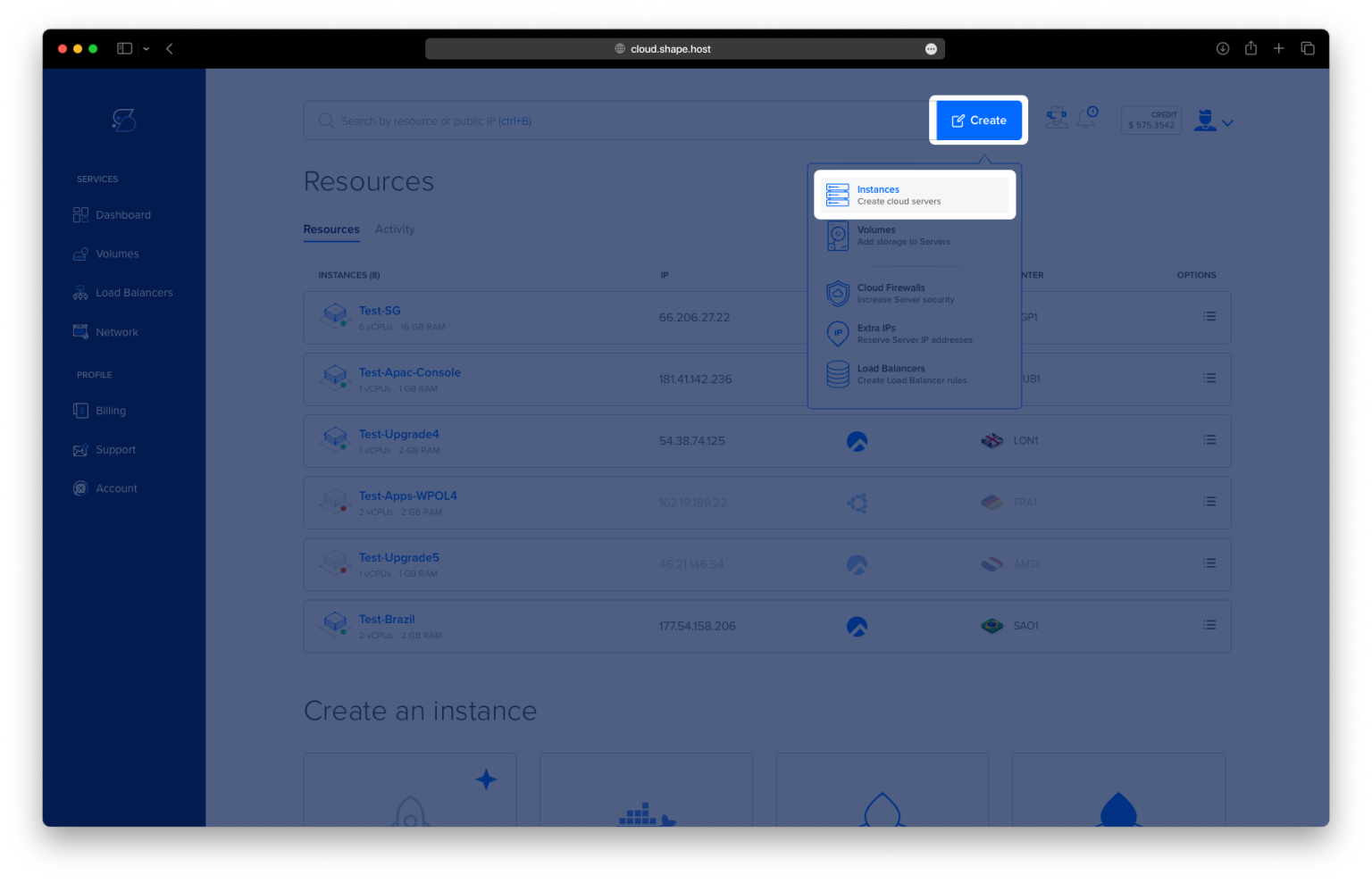
Open the dashboard and click Create.
Select Instance as the resource type.

Choose a data center location close to your users.

Pick a VPS plan with at least:
2 CPU cores
2–4 GB RAM
20 GB SSD storage
Select Debian 12 (Bookworm) as the operating system.

Create the instance and wait for provisioning to finish.

Copy the public IP address of the server.
This VPS will host Docker, ntfy, and Nginx, all running securely behind SSL.

Step 2: Connect to Your Debian 12 Server
Linux / macOS
ssh root@YOUR_SERVER_IP
Windows
Use PowerShell, Windows Terminal, or PuTTY:
ssh root@YOUR_SERVER_IP
After login, you should be authenticated as root on Debian 12.
Step 3: Install ntfy Using Docker Compose
3.1 Update the System
apt update
Updates the package index.
apt upgrade -y
Upgrades all installed packages to their latest versions.

3.2 Install Required Dependencies
apt install ca-certificates curl gnupg lsb-release

Installs tools required to securely add external repositories.
mkdir -p /etc/apt/keyrings
Creates a directory to store trusted repository keys.
3.3 Add Docker Repository for Debian 12
curl -fsSL https://download.docker.com/linux/debian/gpg | gpg --dearmor -o /etc/apt/keyrings/docker.gpg
Downloads and registers Docker’s official GPG key.
echo "deb [arch=$(dpkg --print-architecture) signed-by=/etc/apt/keyrings/docker.gpg] https://download.docker.com/linux/debian bookworm stable" > /etc/apt/sources.list.d/docker.list
Adds the Docker repository for Debian Bookworm.
apt update
Refreshes package lists including Docker packages.

3.4 Install Docker and Docker Compose
apt install docker-ce docker-ce-cli containerd.io docker-buildx-plugin docker-compose-plugin

Installs Docker Engine and Docker Compose plugin.
docker --version
Verifies Docker installation.
docker compose version
Verifies Docker Compose availability.
3.5 Create ntfy Project Structure
mkdir -p /opt/ntfy
cd /opt/ntfy

nano docker-compose.yml
Paste the following content:
services:
  ntfy:
    image: binwiederhier/ntfy:latest
    container_name: ntfy
    restart: unless-stopped
    ports:
      - "127.0.0.1:2586:80"
    volumes:
      - /opt/ntfy/cache:/var/cache/ntfy
      - /opt/ntfy/config:/etc/ntfy
    command: serve
This configuration:
- Runs ntfy in a Docker container
- Binds it only to localhost
- Prepares it for reverse proxy usage

3.6 Create Cache and Config Directories
mkdir -p /opt/ntfy/cache
mkdir -p /opt/ntfy/config

3.7 Configure ntfy Server
nano /opt/ntfy/config/server.yml
Paste:
base-url: https://ntfy.example.com
listen-http: ":80"

cache-file: /var/cache/ntfy/cache.db
behind-proxy: true

auth-default-access: deny
auth-file: /etc/ntfy/auth.db

attachment-cache-dir: /var/cache/ntfy/attachments
attachment-total-size-limit: 5G
attachment-file-size-limit: 50M
This setup:
- Enables reverse proxy support
- Secures access by default
- Allows controlled file attachments

3.8 Start ntfy
docker compose pull
Pulls the latest ntfy image.
docker compose up -d
Starts ntfy in detached mode.
docker compose ps
Confirms the container is running.

Step 4: Configure Nginx Reverse Proxy
4.1 Install and Check Nginx
apt install nginx

systemctl status nginx
4.2 Create Nginx Virtual Host
nano /etc/nginx/sites-available/ntfy
Paste:
server {
    listen 80;
    server_name ntfy.example.com;

    client_max_body_size 100M;

    location / {
        proxy_pass http://127.0.0.1:2586;
        proxy_http_version 1.1;

        proxy_set_header Host $host;
        proxy_set_header X-Real-IP $remote_addr;
        proxy_set_header X-Forwarded-For $proxy_add_x_forwarded_for;
        proxy_set_header X-Forwarded-Proto $scheme;

        proxy_buffering off;
    }
}

4.3 Enable the Configuration
ln -s /etc/nginx/sites-available/ntfy /etc/nginx/sites-enabled/
rm /etc/nginx/sites-enabled/default
nginx -t
systemctl reload nginx

Step 5: Enable SSL with Let’s Encrypt
apt install certbot python3-certbot-nginx

certbot --nginx -d debian-tutorials.shape.host

Replace with your real domain, for example:
yourdomain.com
Certbot will:
- Obtain a free SSL certificate
- Automatically configure Nginx
- Enable HTTPS with auto-renewal

You have deployed ntfy on Debian 12 using Docker Compose, secured it behind Nginx, and enabled SSL with Let’s Encrypt. This setup is stable, secure, and perfectly suited for production environments and infrastructure notifications.
For hosting services like ntfy with excellent performance, scalability, and full root access, Shape.Host Cloud VPS is a strong choice for modern self-hosted applications.