Strapi CMS on AlmaLinux 9 (PostgreSQL + PM2 + Nginx + SSL)
Strapi is an open‑source, Node.js‑based headless CMS that exposes content via REST and GraphQL. On AlmaLinux 9—a RHEL 9–compatible distribution—you get a stable, long‑lifecycle platform suitable for hardened, enterprise deployments.
Stack at a Glance
| Layer | Component | Purpose |
|---|---|---|
| OS | AlmaLinux 9 (kernel 5.14, SELinux enforcing) | Enterprise stability and security baseline |
| Runtime | Node.js LTS (18/20) | Runs Strapi application |
| DB | PostgreSQL 14/15 | Primary data store (content, users, config) |
| Process mgr | PM2 | Keeps Strapi online (restart, logs, clustering) |
| Proxy | Nginx | TLS termination, HTTP/2, compression, routing |
| TLS | Let’s Encrypt or custom PKI | Encrypts admin/API traffic end‑to‑end |
Why PostgreSQL for Strapi
- JSONB columns for flexible content structures plus relational integrity.
- Robust indexing and full‑text search options.
- Strong concurrency and reliability under write/read load.
- Mature tooling for replication, backups, and role management.
Recommended: separate DB node or VM for medium/large deployments, with WAL archiving and regular base backups.
PM2 in Production
- Daemonizes Strapi, auto‑restarts on crash or OOM, and reboots with
pm2 startup. - Cluster mode to utilize multiple CPU cores behind Nginx.
- Centralized logs with rotation; expose metrics via
pm2 monitor PM2 API. - Use an ecosystem file to pin environment variables, cwd, and instances per environment (dev/stage/prod).
Nginx as Reverse Proxy (with SSL)
- Offloads TLS, serves HTTP/2, gzip/brotli, and static assets efficiently.
- Path routing to Strapi (e.g.,
location / { proxy_pass http://127.0.0.1:1337; }). - Apply security headers (HSTS, CSP, X‑Frame‑Options, X‑Content‑Type‑Options).
- Rate limiting or WAF rules to protect the admin panel and auth endpoints.
- Use OCSP stapling and modern ciphers via OpenSSL 3 on AlmaLinux 9.
Security and Hardening on AlmaLinux 9
- SELinux: keep enforcing; add minimal custom policy if Strapi writes outside expected directories.
- FirewallD: expose only 80/443 publicly; restrict Strapi’s internal port (1337) to localhost.
- Secrets management: store credentials in environment variables loaded by PM2; avoid committing
.envto VCS. - RBAC in Strapi: lock down public and authenticated roles; separate admin users; enable email confirmations where appropriate.
- Dependency hygiene: patch Node, Strapi, and plugins frequently; enable
npm auditin CI. - Backups: schedule PostgreSQL dumps or base backups; back up uploads directory and environment configuration.
- Fail2Ban: protect Nginx admin and auth routes from brute force.
Performance and Sizing
Small (MVP / pilot)
- 2 vCPU, 4–8 GB RAM, single Strapi instance under PM2
- PostgreSQL co‑located or managed service
- Nginx on same host
Medium (team content ops, public APIs)
- 4–8 vCPU, 8–16 GB RAM
- PM2 cluster mode (2–4 instances) behind Nginx
- Dedicated PostgreSQL VM (NVMe SSD, tuned
shared_buffers,work_mem) - Object storage (S3‑compatible) for media via Strapi upload provider
Large/High traffic
- Multiple Strapi nodes behind Nginx/Load Balancer
- Managed or HA PostgreSQL (replication, Patroni/Cloud)
- Redis cache for sessions/rate limiters if used by plugins
- CDN in front of Nginx for static and uploads
General tips:
- Set
NODE_ENV=production, build admin once per release. - Cache public GETs at Nginx or CDN where safe.
- Prefer S3/MinIO adapters for uploads to keep stateless app nodes.
Operations & Observability
- Logging: PM2 and Strapi logs to systemd/journald or file; centralize with Fluentd/Vector to ELK/Opensearch.
- Metrics: export Node/PM2 metrics to Prometheus; Nginx stub_status or exporter for proxy metrics; PostgreSQL exporter for DB health.
- Health checks: simple
/or/adminHTTP 200 checks via Nginx; use PM2 health or systemd watchdog for process supervision. - CI/CD: pin Node and package versions; build artifacts once; run DB migrations in controlled pipeline steps.
Typical Use Cases
- Headless CMS for React/Next.js, Vue/Nuxt, SvelteKit, mobile apps.
- Multichannel content APIs with i18n, drafts, and review workflows.
- Product catalogs and marketing sites requiring editorial roles.
- Internal data hubs where teams manage structured content via custom permissions.
Comparison Snapshot (self‑hosted)
| Capability | Strapi | Directus | KeystoneJS | Payload |
|---|---|---|---|---|
| DB support | PostgreSQL/MySQL/SQLite | PostgreSQL | PostgreSQL/Mongo | PostgreSQL |
| Admin UI | Built‑in, refined | Built‑in, data‑first | Built‑in | Built‑in |
| API styles | REST + GraphQL plugin | REST + GraphQL | REST + GraphQL | REST + GraphQL |
| Extensibility | Plugins, policies, lifecycles | Hooks/flows | Schemas/hooks | Hooks/plugins |
| Files | Local, S3, adapters | Local, S3 | Local, S3 | Local, S3 |
Strapi balances a mature admin UI, strong plugin ecosystem, and straightforward extensibility with policies, controllers, and lifecycle hooks.
Practical Checklist
- Choose Node LTS version and lock it; build the admin in CI.
- Use PostgreSQL 14/15, tune memory and WAL for workload.
- Run Strapi under PM2 with an ecosystem config; enable startup on boot.
- Put Nginx in front; terminate TLS; restrict port 1337 to localhost.
- Enforce RBAC and secure public permissions; review plugin access.
- Externalize media to S3/MinIO for scalability; use a CDN if public.
- Back up DB and uploads; test restores; rotate logs; patch regularly.
A Strapi + PostgreSQL + PM2 + Nginx + SSL stack on AlmaLinux 9 delivers a durable, secure, and scalable headless CMS platform. You gain enterprise‑grade OS stability (SELinux, long lifecycle) with modern Node tooling, robust relational storage, resilient process management, and a hardened TLS front end—well‑suited for both MVPs and high‑traffic production APIs.
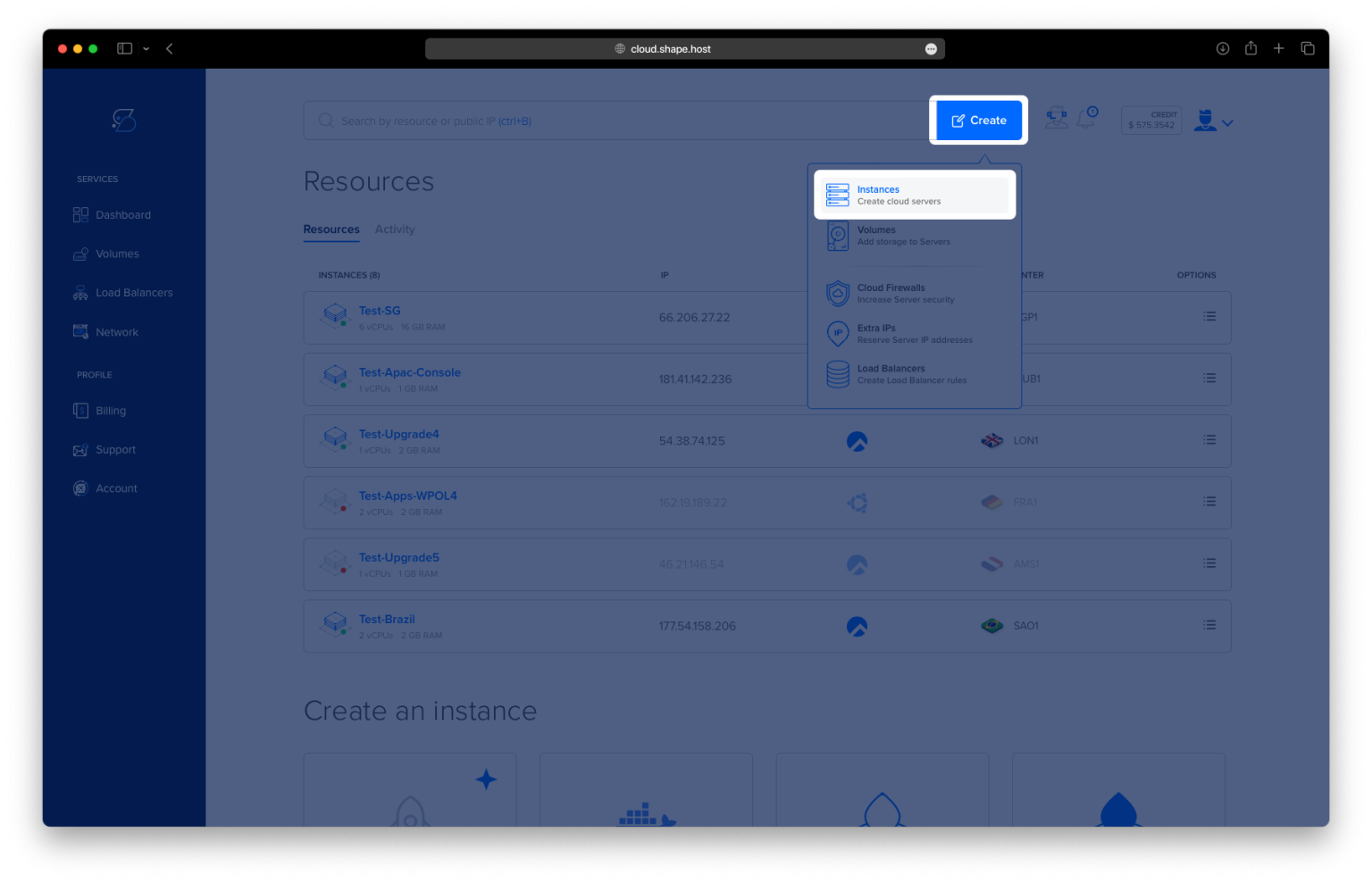
Step 1: Create an AlmaLinux 9 VPS on Shape.Host
Go to https://shape.host and log in.
Click “Create”, then select “Instance”.

Choose the server location closest to your target audience.

Select AlmaLinux 9 (64-bit) as the operating system.
Pick a plan with at least 2 CPUs, 4 GB RAM, and 20 GB SSD.

Click “Create Instance”.

Copy the IP address from the “Resources” section.

Step 2: Connect to the Server
ssh root@your-server-ip
Step 3: Update System and Install Base Packages
dnf update -y
dnf install curl wget nano unzip git -y


Step 4: Install and Configure PostgreSQL 16
First, enable the PostgreSQL repository:
dnf install https://download.postgresql.org/pub/repos/yum/reporpms/EL-9-x86_64/pgdg-redhat-repo-latest.noarch.rpm -y

Install PostgreSQL 16:
dnf install postgresql16 postgresql16-server postgresql16-contrib -y

Initialize the database:
/usr/pgsql-16/bin/postgresql-16-setup initdb

Enable and start the service:
systemctl enable postgresql-16
systemctl start postgresql-16

Log into PostgreSQL and create the database and user:
su - postgres -c psql
Inside the prompt:
CREATE DATABASE strapidb;
CREATE USER strapiuser WITH ENCRYPTED PASSWORD 'YourStrongPassword';
ALTER DATABASE strapidb OWNER TO strapiuser;
\q

Step 5: Install Node.js 20 and NPM
curl -fsSL https://rpm.nodesource.com/setup_20.x | bash -
dnf install nodejs -y
node -v
npm -v


Step 6: Create and Build Strapi Project
Navigate to the root directory and create a new Strapi app:
cd /root
npm create strapi-app@latest my-project

Go to the project folder and build for production:
cd my-project
NODE_ENV=production npm run build

Install PostgreSQL support:
npm install pg

Step 7: Install and Configure PM2
Install PM2 globally:
npm install -g pm2

Create the PM2 configuration:
nano ecosystem.config.js
Paste:
module.exports = {
  apps: [
    {
      name: 'strapi',
      cwd: '/root/my-project',
      script: 'npm',
      args: 'start',
      env: {
        NODE_ENV: 'production',
        HOST: '127.0.0.1',
        PORT: '1337',
        DATABASE_CLIENT: 'postgres',
        DATABASE_HOST: '127.0.0.1',
        DATABASE_PORT: '5432',
        DATABASE_NAME: 'strapidb',
        DATABASE_USERNAME: 'strapiuser',
        DATABASE_PASSWORD: 'YourStrongPassword'
      }
    }
  ]
};

Start and enable PM2:
pm2 start ecosystem.config.js
pm2 startup
pm2 save


Step 8: Install and Configure Nginx
dnf install nginx -y

Create the reverse proxy configuration:
nano /etc/nginx/conf.d/strapi.conf
Paste:
server {
    listen 80;
    server_name your_domain.com;

    location / {
        proxy_pass http://127.0.0.1:1337;
        proxy_set_header Host $host;
        proxy_set_header X-Real-IP $remote_addr;
        proxy_http_version 1.1;
        proxy_set_header Upgrade $http_upgrade;
        proxy_set_header Connection 'upgrade';
        proxy_cache_bypass $http_upgrade;
    }
}

Enable and restart Nginx:
systemctl enable nginx
systemctl restart nginx

Step 9: Install and Configure SSL with Let’s Encrypt
dnf install certbot python3-certbot-nginx -y
certbot --nginx -d almalinux-tutorials.shape.host -m contact@shape.host --agree-tos --no-eff-email


Strapi CMS is now installed and running on AlmaLinux 9 with PostgreSQL, PM2, Nginx, and SSL.
You can access it at:
https://almalinux-tutorials.shape.host

