Strapi CMS on Ubuntu 24.04 (with PostgreSQL, PM2 & Nginx)
Strapi is a powerful, open-source headless CMS written in Node.js, designed to create, manage, and expose content via RESTful or GraphQL APIs. It’s widely used by developers building JAMstack applications, mobile apps, and single-page frontends that require a robust, customizable backend.
When deployed on Ubuntu 24.04 with PostgreSQL, PM2, and Nginx, Strapi becomes a production-ready, performant, and scalable content platform ideal for enterprise and modern web projects.
Key Technologies in This Stack
| Component | Role |
|---|---|
| Strapi | Node.js-based headless CMS |
| PostgreSQL | Primary database for content and settings storage |
| PM2 | Process manager to keep the Strapi app running |
| Nginx | Reverse proxy for SSL, HTTP/2, and performance |
| Ubuntu 24.04 | OS with long-term support, security, and stability |
Why PostgreSQL for Strapi?
Strapi supports SQLite, MySQL, MariaDB, and PostgreSQL. Among these, PostgreSQL is the recommended production database, offering:
- Better performance under high loads
- Advanced JSONB support for flexible content
- Full-text search and indexing
- ACID-compliant transactions
- Strong data integrity and role management
PostgreSQL integrates smoothly with Ubuntu 24.04 and is available from official repositories or via upstream packages for newer versions.
Role of PM2 in Strapi Deployments
PM2 is a production-grade process manager for Node.js applications. It provides:
- Zero-downtime reloads
- Startup scripts with
pm2 startup - Process monitoring and auto-restart on crash
- Cluster mode for performance scaling
- Log management with built-in log rotation
Using PM2 ensures that Strapi runs as a background service, restarts automatically on reboots, and can be scaled or monitored easily.
Why Use Nginx with Strapi?
Although Strapi can serve HTTP traffic directly, Nginx adds a layer of performance, security, and production hardening:
- Acts as a reverse proxy to forward requests to Strapi (usually running on port 1337)
- Handles SSL/TLS termination (e.g., using Let’s Encrypt certificates)
- Supports HTTP/2 and gzip compression
- Can serve static assets, redirects, rate-limiting, and caching rules
- Enables firewalling and filtering before reaching Strapi
This combination makes Strapi + Nginx an excellent solution for scalable web APIs, especially in enterprise and cloud deployments.
Security Considerations
Deploying Strapi securely in production requires:
- HTTPS only via Nginx
- Environment variables for database credentials and API secrets
- Firewall rules (UFW or nftables) to restrict port access
- Fail2Ban for brute-force protection on the admin panel
- Keeping Strapi and dependencies updated regularly
- Using custom user roles and permissions within the Strapi admin interface
Ubuntu 24.04 provides modern crypto libraries (OpenSSL 3.x) and AppArmor for optional process-level confinement.
Strapi in Production on Ubuntu 24.04 – Best Practices
- Use PostgreSQL instead of SQLite for scalable, multi-user environments
- Keep Strapi behind Nginx for better control and resilience
- Use PM2 with ecosystem files to manage multiple environments (dev/staging/prod)
- Set
NODE_ENV=productionfor optimized builds - Regularly back up PostgreSQL and
.envconfig files - Serve Strapi’s public and upload folders with appropriate Nginx location blocks
Use Cases for Strapi
- JAMstack apps with React, Vue, Svelte, Astro, or Next.js
- Mobile app backends with REST or GraphQL APIs
- Multi-language content delivery using internationalization (i18n) plugins
- Corporate websites with role-based editorial workflows
- E-commerce CMS layer integrated with Shopify, Snipcart, or custom carts
- Internal portals and dashboards for structured content management
Strapi’s modular plugin system and extensible API make it suitable for both startups and large-scale digital platforms.
Strapi vs. Other Headless CMSs
| Feature | Strapi | Directus | KeystoneJS | Sanity | Contentful (SaaS) |
|---|---|---|---|---|---|
| Self-hosted | ✅ Yes | ✅ Yes | ✅ Yes | ✅ Yes | ❌ No |
| Database | PostgreSQL/MySQL | PostgreSQL | MongoDB/Postgres | Hosted | Managed |
| Admin UI | Built-in | Built-in | Built-in | Built-in | Built-in |
| Custom Fields | ✅ Full control | ✅ Flexible | ✅ Schema-driven | ✅ Groq-based | ✅ |
| GraphQL Support | ✅ Yes | ✅ Yes | ✅ Yes | ✅ Yes | ✅ Yes |
| Open Source | MIT | GPL | MIT | Source-available | ❌ Proprietary |
Strapi stands out by offering a balance of flexibility, visual admin panel, REST/GraphQL APIs, and full database control, making it especially attractive for developers who want to own their data and deployment.
Deploying Strapi CMS on Ubuntu 24.04 with PostgreSQL, PM2, and Nginx provides a:
- Secure and scalable headless CMS platform
- Developer-friendly environment with full control over APIs, schema, and content
- Production-ready deployment stack that ensures uptime, monitoring, and performance
- Ideal backend for modern web and mobile applications
This stack offers a mature, modular, and flexible content solution that works well for both MVPs and large-scale content-driven projects.
Step 1: Create a VPS on Shape.Host
Go to https://shape.host and log in.
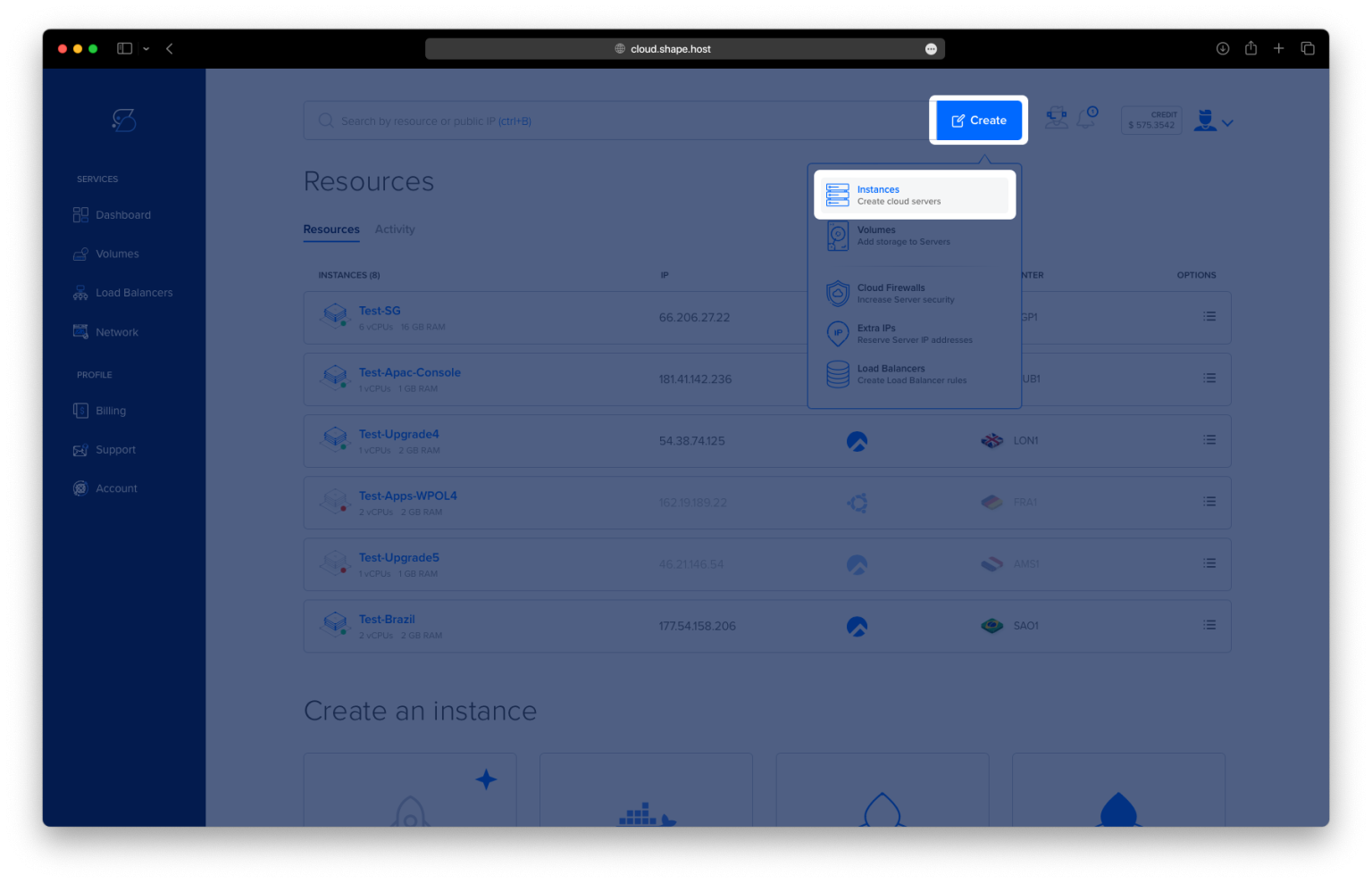
Click “Create”, then choose “Instance”.

Choose a server location closest to your users.

Select Ubuntu 24.04 (64-bit) as the operating system.
Choose a plan with at least 2 CPUs, 4 GB RAM, and 20 GB SSD.

Click “Create Instance”.

Copy the IP address from the “Resources” tab once the instance is ready.

Step 2: Connect to Your Server via SSH
ssh root@your-server-ip
Step 3: Install System Dependencies
apt update && apt upgrade -y
apt install curl wget nano gnupg2 software-properties-common ca-certificates unzip


Step 4: Install and Configure PostgreSQL
apt install postgresql postgresql-contrib

Create the database and user:
su - postgres -c psql
Inside the PostgreSQL prompt:
CREATE DATABASE strapidb;
CREATE USER strapiuser WITH ENCRYPTED PASSWORD 'YourStrongPassword';
ALTER DATABASE strapidb OWNER TO strapiuser;
\q
🔐 Replace
'YourStrongPassword'with a secure password.

Step 5: Install Node.js 20 and NPM
curl -fsSL https://deb.nodesource.com/setup_20.x | bash -
apt install nodejs
node -v
npm -v


(Optional: Update NPM)
npm install -g npm@11.5.2

Step 6: Create Your Strapi Project
npm create strapi-app@latest my-project
cd my-project
NODE_ENV=production npm run build


Step 7: Run Strapi with PM2 (Process Manager)
Install PM2:
npm install -g pm2

Create the ecosystem config file:
nano ecosystem.config.js
Paste this:
module.exports = {
  apps: [
    {
      name: 'strapi',
      cwd: '/root/my-project',
      script: 'npm',
      args: 'start',
      env: {
        NODE_ENV: 'production',
        DATABASE_HOST: '127.0.0.1',
        DATABASE_PORT: '5432',
        DATABASE_NAME: 'strapidb',
        DATABASE_USERNAME: 'strapiuser',
        DATABASE_PASSWORD: 'YourStrongPassword'
      }
    }
  ]
};

Start and enable PM2 on boot:
pm2 start ecosystem.config.js
pm2 startup
pm2 save


Step 8: Install and Configure Nginx as Reverse Proxy
apt install nginx

Create a new config file:
nano /etc/nginx/sites-available/strapi
Paste this config:
server {
    listen 80;
    server_name your_domain.com;

    location / {
        proxy_pass http://localhost:1337;
        proxy_set_header Host $host;
        proxy_set_header X-Real-IP $remote_addr;
        proxy_http_version 1.1;
        proxy_set_header Upgrade $http_upgrade;
        proxy_set_header Connection 'upgrade';
        proxy_cache_bypass $http_upgrade;
    }
}

Enable the config and restart Nginx:
ln -s /etc/nginx/sites-available/strapi /etc/nginx/sites-enabled/
nginx -t && systemctl reload nginx

Step 9: Secure with SSL (Let’s Encrypt)
Install Certbot:
apt install certbot python3-certbot-nginx

Get a free SSL certificate:
certbot --nginx -d ubuntu-tutorials.shape.host -m contact@shape.host --agree-tos --no-eff-email

Step 10: Access Your Strapi CMS
Now you can access Strapi at:
https://ubuntu-tutorials.shape.host


You now have a secure Strapi CMS running on Ubuntu 24.04, managed with PM2, behind Nginx, and using a PostgreSQL database.
For lightning-fast Cloud VPS hosting, visit Shape.Host and deploy your next project today.